
About this Data Sheet
Purpose and Scope
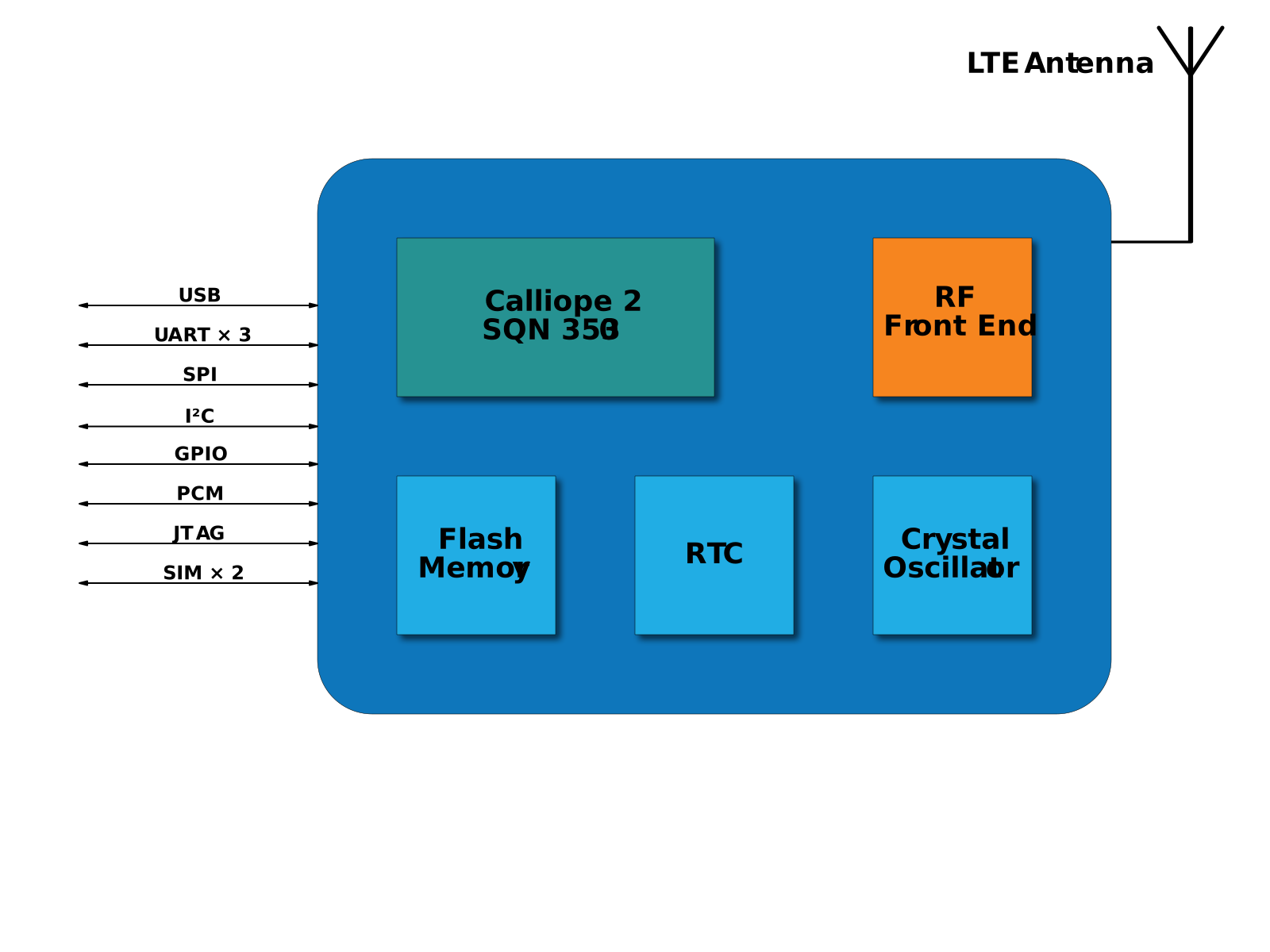
The GC02S1-WW module is a complete LTE Cat 1bis system including base-band, RF and memory, targeting mass-market wearables, consumers and M2M / IoT devices. This document provides the technical information about the GC02S1-WW LGA module (worldwide version). This Calliope 2 module is based on Sequans’s SQN3530 chipset.
Changes in this Document
This is the first edition of this manual, superseding the third preliminary version. Specifications given herein are subject to change.
| Rev. | Date | Changes |
|---|---|---|
| 1 | July 2026 |
|
| P3 | June 2026 |
|
| P2 | Feb. 2026 |
|
| P1 | Sept. 2025 | N/A |
General Description
The Calliope 2 GC02S1-WW module is based on Sequans’s second-generation Calliope 2 silicon and delivers optimised 4G LTE Cat 1bis connectivity for IoT, M2M and consumer devices such as wearables and hearables, that require a higher speed than what LTE-M provides.
Calliope 2 provides significant improvements in performance and power consumption over Calliope 1, while offering a seamless migration, because it also leverages Sequans’s existing 4G LTE protocol stack, one of the most mature and proven in the entire LTE ecosystem. The Calliope 2 GC02S1-WW module includes Sequans’s Calliope 2 platform and all other elements needed for a LTE modem system, including an LTE optimised transceiver, an RF front end, and key interfaces in a compact, cost-effective form factor that needs no external components.
Frequency Bands
Block Diagram
General Features
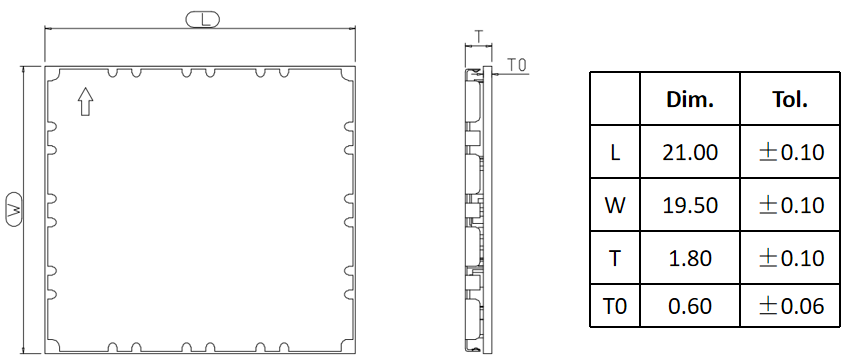
| Physical Characteristics | LGA module, 142 pads. Size: 21 × 19.5 × 1.8 mm typ. |
| Temperature and Humidity Ranges |
Board temperature range: -40 to +85 °C. Humidity: 10 to 85% (non-condensing). Storage: MSL3. |
| Power Supply | 3.3 to 4.5 V (see section Power). |
| Maximum Tx Power | +23 dBm in each band. |
| Interfaces |
|
| SMS | SMS over IMS or NAS. |
| Firmware Upgrade | USB or UART interfaces, FOTA, support of differential firmware upgrade. |
| RoHS/REACH | All hardware components are fully compliant with EU RoHS directive, bromine-free, REACH compliant. |
| LTE Features |
|
Applications
- Utility meters
- Industrial sensors
- Security and alarm systems
- Payment systems
- Asset trackers
- Smart home devices
- Smart meters
- Wearable consumer applications.
Available Part Numbers
| Part Number | Product Name | Software Build (ATI1) | UE Version (ATI1) | PTCRB/GCF Model Name | SVN | Status |
|---|---|---|---|---|---|---|
| GC02RWAQRA | GC02S1-WW | LR 9.0.7.1 | UE 9.0.7.1 | GC02S1-WW | 08 | Available, unlocked OTP |
| GC02RWAQRB | GC02S1-WW | LR 9.0.7.1 | UE 9.0.7.1 | GC02S1-WW | 08 | Secure module available, OTP locked |
Interfaces
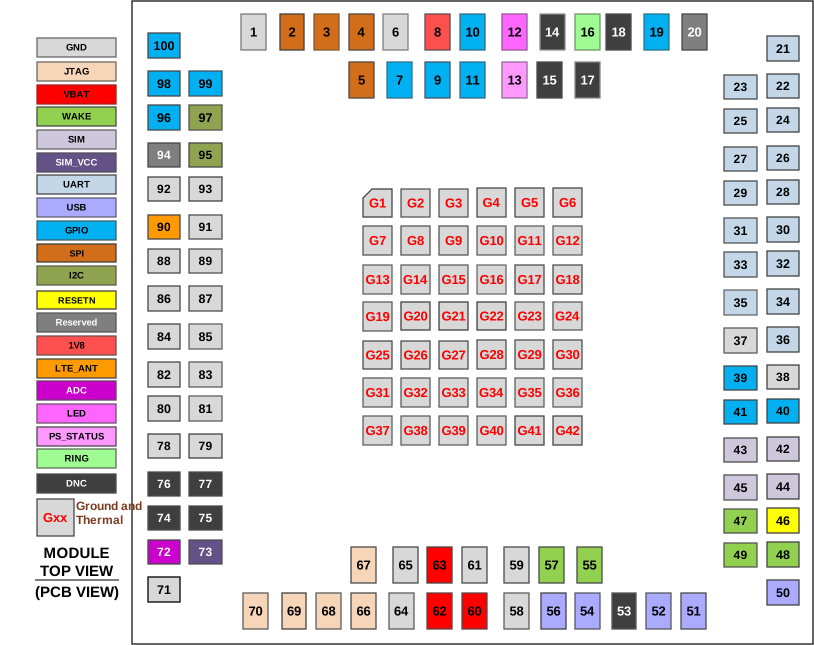
The GC02S1-WW module includes communication I/O ports, GPIO and antenna RF I/O. This chapter provides description of all the GC02S1-WW’s interfaces.
Power supply pins pin-out and characteristics are detailed in section Electrical, RF and Thermal Characteristics.
Pin Assignment
UART
Introduction
Serial communications between the GC02S1-WW and the host platform can use any of the four UART interfaces named UART 0, 1 and 2, all of which implement flow control.
- The Host-Modem interface exchanges data with the modem using standard or proprietary AT commands. This mode requires a high-speed UART port with flow control.
- The Modem Console interface copies the logs from the LTE modem
- The Debug interface (also referred to as DCP) is needed by the DMTool during design verification or debugging. This interface can be used to upgrade with SFU.
| UART Port | Default Usage of Port | Available Usage of Port |
|---|---|---|
| UART 0 | AT Commands | Host-Modem interface |
| UART 12 | AT Commands | Manufacturing, debug and upgrade |
| UART 2 | Modem Console | Modem Console |
Various UART-to-USB converters were tested on Calliope 2 modules, including the Exar XR21V1410™, FTDI FT234XD™ or FTDI FT4232H™. Implementation examples are available on the GC02S1 EVK’s reference design schematics or in other Sequans's documents.
UART Electrical Characteristics
| Symbol | Minimum | Maximum | Unit |
|---|---|---|---|
|
VIH |
1.26 | 3.3 | V |
|
VIL |
0 | 0.54 | V |
|
VOH |
1.44 | 1.8 | V |
|
VOL |
0 | 0.36 | V |
UART Signals
| Pad # | Pad Name | Primary Function | Alternate3 |
Direction | Pad type | Voltage | Drive4 |
Reset state |
|---|---|---|---|---|---|---|---|---|
| UART0 | ||||||||
| 36 | GPIO12/TXD0 | TXD0 | GPIO12 | In/Out | BIDIR | 1.8 V | T to H | High-Z, T |
| In for primary function, UART0. | ||||||||
| 34 | GPIO13/RXD0 | RXD0 | GPIO13 | In/Out | BIDIR | 1.8 V | T to H | Out-1, T |
| Out for primary function, UART0. | ||||||||
| 35 | GPIO14/ CTS0 | CTS0 | GPIO14 | In/Out | BIDIR | 1.8 V | T to H | Out-1, T |
| Out for primary function, UART0. | ||||||||
| 33 | RTS0 | RTS0 | N/A | In | IN | VBAT | N/A | High-Z |
| Wake signal enabled by default. | ||||||||
| UART1 | ||||||||
| 32 | TXD1 | TXD1 | N/A | In | BIDIR | 1.8 V | T to H | High-Z, T |
| UART1 | ||||||||
| 30 | RXD1 | RXD1 | N/A | Out | BIDIR | 1.8 V | T to H | Out-1, T |
| UART1 | ||||||||
| 31 | CTS1 | CTS1 | N/A | Out | BIDIR | 1.8 V | T to H | Out-1, T |
| UART1 | ||||||||
| 29 | RTS1 | RTS1 | N/A | In | IN | VBAT | N/A | High-Z |
| Wake signal enabled by default. | ||||||||
| UART2 | ||||||||
| 28 | GPIO15/TXD2 | TXD2 | GPIO15 | In/Out | BIDIR | 1.8 V | T to H | High-Z, T |
| In for primary function, UART2. | ||||||||
| 26 | GPIO16/RXD2 | RXD2 | GPIO16 | In/Out | BIDIR | 1.8 V | T to H | Out-1, T |
| Out for primary function, UART2. | ||||||||
| 27 | GPIO18/ CTS2/ DSR0 | CTS2 | GPIO18/ DSR0 | In/Out | BIDIR | 1.8 V | T to H | Out-1, T |
| UART2 | ||||||||
| 25 | GPIO17/ RTS2/ DCD0 | RTS2 | GPIO17/ DCD0 | In/Out | BIDIR | 1.8 V | T to H | High-Z, T |
| UART2 | ||||||||
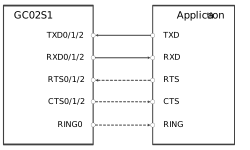
The GC02S1-WW complies to the DCE-DTE convention for UART lines. It is designed as a DCE (Data Communication Equipment).
The output from the device at one end of the link connects to the corresponding input at the other end of the link and vice versa. The figure below represents the typical implementation for the UART connection (including hardware flow control in case of high-speed UARTs).
- Port TxD on the application board side sends data to the GC02S1-WW's TxD signal line.
- Port RxD on the application board side receives data from the GC02S1-WW's RxD signal line.
-
CTS0, CTS1, CTS2: Clear-To-Send signals of resp. UART0, UART1, UART2 (active low). To be connected to the CTS of the remote UART device.
Leave CTS unconnected if hardware flow control is not used.
-
RTS0, RTS1, RTS2: Request-To-Send signals of resp. UART0, UART1, UART2 (active low). To be connected to the RTS of the remote UART device. Use a 1 kΩ pull-down when flow control is not used.
In order for the module to properly enter low power mode, if hardware flow control is not used, it must
also be disabled using AT+SQNHWCFG.
Figure 3 represents the typical implementation for hardware flow control.
In case the design uses voltage buffers/translators, care must be taken that the flow control signals RTS and CTS are correctly driven on both sides of the UART interface.
UART 0 Interface
- UART 0 signals should be connected to test points.
- A pull-up is recommended on UART 0’s RTS and CTS signals (see warning above).
- UART 0’s tracks should be routed on a buried layer to reduce the EM leakage.
Default Configuration
- Baud rate: 115200 (maximum speed: 4000000 bit/s)
- Data: 8 bits
- Parity: None
- Stop : 1 bit
- Flow control: Hardware (RTS/CTS)
Behaviour in Low Power Mode
- The module power mode selection is internally managed by the module software.
- RTS0 signal is an input to the module. The host uses it to wake the module up. A pull-up, either internal or external, is recommended on this signal to avoid the module waking up if the host goes into low power mode and leaves the pad floating.
- CTS0 is an output of the module. It signals when the modem is ready to receive characters. Since the modem does not drive this signal during deep sleep mode, it is preferable to pull the signal up either internally or externally.
UART 1 Interface
- UART 1’s signals should be connected to test points.
- A pull-up is recommended on UART 1’s RTS signal (see warning above).
Default Configuration
UART 1 is in ‘AT-command’ mode by default.
- Baud rate: 921600 (maximum speed: 4000000 bit/s)
- Data: 8 bits
- Parity: None
- Stop: 1 bit
- Flow control: Hardware (RTS/CTS)
Behaviour in Low Power Mode
- The module power mode selection is internally managed by the module’s software.
- The RTS1 signal can be used by the host as an alternative to RTS0 to wake the module up.
UART 2 Interface
Default Configuration
UART 2 is in console mode by default. The boot log is sent on this interface.
- Baud rate: 115200 (max speed: 115200 bit/s)
- Data: 8 bits
- Parity: None
- Stop : 1 bit
- Flow control: None
Behaviour in Low Power Mode
UART 2 RTS cannot be used to wake the module from low power modes.
USB
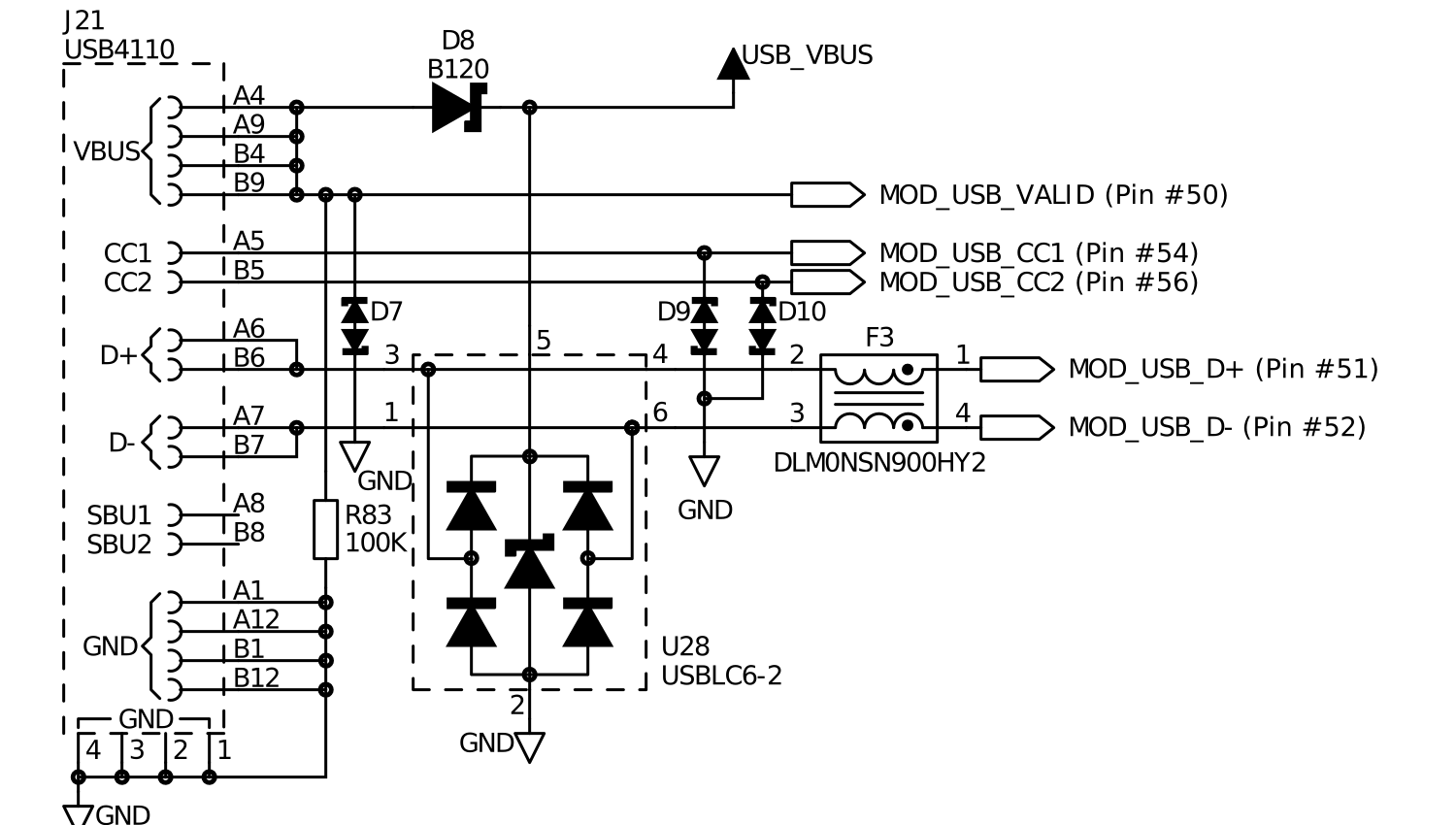
- USB CDC_ACM: Data and control from external MCU using AT commands (UART emulation)
- USB CDC_ECM: Data (IP) from external MCU (IP traffic sent on the LTE network)
- USB SFU: Firmware upgrade
AT+SQNUSBCFG, AT+BIND and
AT+SQNHWCFG commands in the relevant AT Commands Reference
Manual for more information.- All USB CDC_ACM ports are initially configured in AT mode
- Changes made by the
AT+BINDcommand are lost with any subsequent reset. Persistent changes must use theAT+SQNHWCFGcommand. - The USB interface works in slave mode and cannot connect to more than one master at a time.
| Pad # | Pad Name | Primary Function | Direction | Pad type | Mandatory |
|---|---|---|---|---|---|
| 50 |
USB_EXT_VBUS_VLD |
Wake from sleep | In | VBAT | NO |
| 51 | USB_D+ | USB In/Out | In/Out | BIDIR | YES |
| 52 | USB_D- | USB In/Out | In/Out | BIDIR | YES |
| 54 | USB_CC1 | USB In/Out | In/Out | BIDIR | NO |
| 56 | USB_CC2 | USB In/Out | In/Out | BIDIR | NO |
| 7 | GPIO11/SPI_CSN1/USBDRDY | GPIO11 | Output | BIDIR | NO |
AT+SQNHWCFG command (see the AT Commands Reference Manual LR
9.0).USB Example Schematics
USB and UART Availability for Built-in Software Services
The UART/USB interfaces of the GC02S1-WW are used by different built-in service providers. Table details the interfaces available to the different services bundled with the standard software releases issued by Sequans. If interface and service are compatible, the corresponding cell is filled with a 'x', otherwise it is left blank.
| SERVICE | UARTx | USB_ACMx | USB_ECM |
|---|---|---|---|
| PPP | x | x | |
| AT Commands | x | x | |
| MUX | x | ||
| Console | x | x | |
| SFU Upgrade | x | x | |
| Debug (DM Tool) | x | x |
- Only one CDC_ECM interface is available, but this interface supports VLAN (multiplexed IP channels)
- ECM is exclusive to every other data access protocol. When ECM is enabled with the
AT+SQNHWCFGcommand, PPP and the internal IP stack are unavailable.
USIM Interfaces
SIM0 Interface
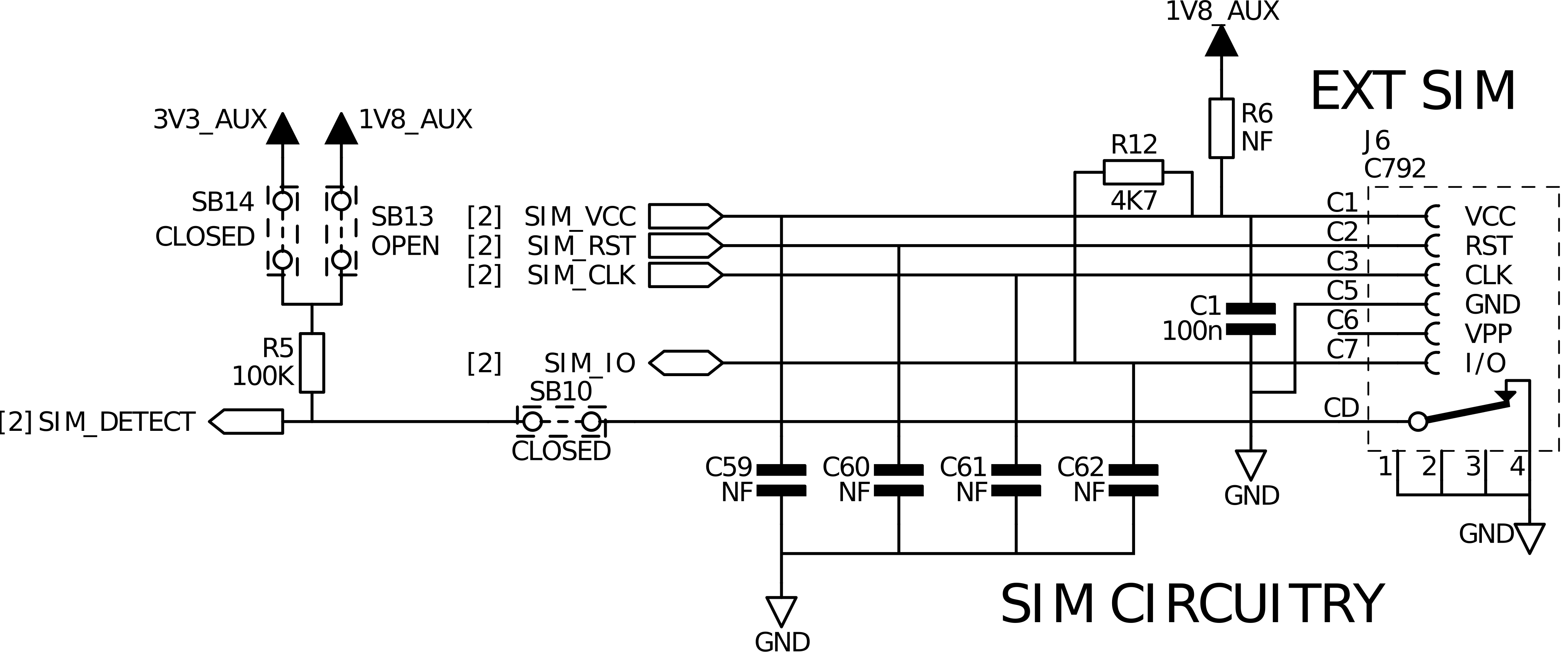
This is the main external SIM interface. It can be used with removable or soldered SIM chips. The modem manages the SIM’s power supply to keep the power budget as low as possible.
| Pad # | Pad Name | Direction | Pad type 5 | Voltage | Drive 6 Strength | Reset State | Comment |
|---|---|---|---|---|---|---|---|
| 42 | SIM0_CLK | Out | BIDIR | 1.8 V | T to H | Out-0, T | Main SIM |
| 45 | SIM0_DETECT 7 | In | IN | VBAT | N/A | High-Z | Main SIM |
| 44 | SIM0_IO | In/Out | BIDIR | 1.8 V | T to H | High-Z, T | Main SIM |
| 43 | SIM0_RESETN | Out | BIDIR | 1.8 V | T to H | Out-0, T | Main SIM |
| 73 | SIM0_VCC 8 | Out | SUPPLY | 1.8 V | T to H | Out-0, T | Main SIM |
SIM1 Interface
This GC02S1-WW ’s interface to a second SIM is typically dedicated to soldered SIM chips (neither SIM detect nor SIM VCC are provided). The soldered SIM can be powered from the VBAT signal using a DC/DC regulator, if need be. If the board uses a single SIM, it should be connected to the main SIM interface (see Section SIM0 Interface above).
| Pad # | Pad Name | Primary Function | Alternate9 Function |
Direction | Pad10 Type | Voltage | Drive11 Strength | Reset state |
|---|---|---|---|---|---|---|---|---|
| 40 | GPIO26/SIM1_CLK | GPIO26 | SIM1_CLK | Out | BIDIR | 1.8 V | T to H | Out-0, T |
| 41 | GPIO27/SIM1_RESETN | GPIO27 | SIM1_RESETN | Out | BIDIR | 1.8 V | T to H | Out-0, T |
| 39 | GPIO25/SIM1_IO | GPIO25 | SIM1_IO | In/Out | BIDIR | 1.8 V | T to H | High-Z, T |
Other Hardware Considerations
- Use a 100 nF decoupling capacitor on SIM_VCC.
- Use a 4.7 kΩ pull-up resistor between SIM_VCC and SIM_IO.
- The SIM connector should be located as close as possible to the GC02S1-WW.
- Please ensure ground continuity between the SIM card and the GC02S1-WW.
- If the application handles SIM card hot swapping, the SIM slot must contain a card detector in order for the software to process the event immediately. Default software configuration is to support SIM_DETECT.
- If the SIM card tray does not support SIM_DETECT (not recommended), keep the SIM_DETECT signal high and configure the module for SIM card detection using polling mode.
I²C
| Pad # | Pad Name | Primary Function | Alternate12 |
Direction | Pad Type13 | Voltage | Drive14 Strength | Reset State |
|---|---|---|---|---|---|---|---|---|
| 95 | GPIO23/I2C_SDA | GPIO23 | I2C_SDA | In/Out | BIDIR | 1.8 V | T to M | High-Z |
| 97 | GPIO24/I2C_SCL | GPIO24 | I2C_SCL | In/Out | BIDIR | 1.8 V | T to M | High-Z |
SPI
| Pad # | Pad Name | Primary Function | Alternate15 |
Direction | Pad Type16 | Voltage | Drive17 Strength | Reset state |
|---|---|---|---|---|---|---|---|---|
| 3 | GPIO7/SPI_SDI | GPIO7 | SPI_SDI | In/Out | BIDIR | 1.8 V | T, L | High-Z |
| 4 | GPIO8/SPI_SDO | GPIO8 | SPI_SDO | In/Out | BIDIR | 1.8 V | T, L | High-Z |
| 2 | GPIO9/SPI_CLK | GPIO9 | SPI_CLK | In/Out | BIDIR | 1.8 V | T, L | High-Z |
| 5 | GPIO10/SPI_CSN0 | GPIO10 | SPI_CSN0 | In/Out | BIDIR | 1.8 V | T, L | High-Z |
| 7 | GPIO11/SPI_CSN1/USBDRDY | GPIO11 | SPI_CSN1/USBDRDY | In/Out | BIDIR | 1.8 V | T, L | High-Z |
GPIO
31 GPIOs are available on the GC02S1-WW: the first 27 are named GPIO1 to GPIO27 and the last five GPIO31 to GPIO35 (GPIO32 corresponds to the RESETN signal is and therefore unavailable). The GPIOs are documented in this data sheet based on their shared or assigned function.
GPIO2 has a special function as both PS_STATUS and emergency shutdown signalling pin. Please refer to the emergency shutdown section in the following sub-chapter, and also to Table 15. for details on PS_STATUS.
| Pin | Functions | Primary |
Alternate |
Dir. | Pad Type | Voltage | Drive18 Strength | Reset |
|---|---|---|---|---|---|---|---|---|
| 12 | GPIO1/STATUS_LED | STATUS_LED | GPIO1 | In/Out | BIDIR | 1.8 V | T to H | High-Z, T |
| Primary Function: Status LED (STATUS_LED, OUT). On when the module is attached to the network, blinks during data transmission. | ||||||||
| 13 | GPIO2/SHTDWN/PS_STATUS | PS_STATUS | GPIO2/SHTDWN | In/Out | BIDIR | 1.8 V | T to H | High-Z, T |
| Primary Function: Power Saving status (PS_STATUS, OUT) enabled by default. Active high. | ||||||||
| 98 | GPIO3 | GPIO3 | In/Out | BIDIR | 1.8 V | T, L | High-Z | |
| 96 | GPIO4 | GPIO4 | In/Out | BIDIR | 1.8 V | T, L | High-Z | |
| 99 | GPIO5 | GPIO5 | In/Out | BIDIR | 1.8 V | T, L | High-Z | |
| 100 | GPIO6 | GPIO6 | In/Out | BIDIR | 1.8 V | T, L | High-Z | |
| 3 | GPIO7/SPI_SDI | GPIO7 | SPI_SDI | In/Out | BIDIR | 1.8 V | T, L | High-Z |
| 4 | GPIO8/SPI_SDO | GPIO8 | SPI_SDO | In/Out | BIDIR | 1.8 V | T, L | High-Z |
| 2 | GPIO9/SPI_CLK | GPIO9 | SPI_CLK | In/Out | BIDIR | 1.8 V | T, L | High-Z |
| 5 | GPIO10/SPI_CSN0 | GPIO10 | SPI_CSN0 | In/Out | BIDIR | 1.8 V | T, L | High-Z |
| 7 | GPIO11/SPI_CSN1/USBDRDY | GPIO11 | SPI_CSN1/USBDRDY | In/Out | BIDIR | 1.8 V | T, L | High-Z |
| 36 | GPIO12/TXD0 | TXD0 | GPIO12 | In/Out | BIDIR | 1.8 V | T to H | High-Z, T |
| 34 | GPIO13/RXD0 | RXD0 | GPIO13 | In/Out | BIDIR | 1.8 V | T to H | Out-1, T |
| 35 | GPIO14/ CTS0 | CTS0 | GPIO14 | In/Out | BIDIR | 1.8 V | T to H | Out-1, T |
| 28 | GPIO15/TXD2 | TXD2 | GPIO15 | In/Out | BIDIR | 1.8 V | T to H | High-Z, T |
| 26 | GPIO16/RXD2 | RXD2 | GPIO16 | In/Out | BIDIR | 1.8 V | T to H | Out-1, T |
| 25 | GPIO17/ RTS2/ DCD0 | RTS2 | GPIO17/ DCD0 | In/Out | BIDIR | 1.8 V | T to H | High-Z, T |
| 27 | GPIO18/ CTS2/ DSR0 | CTS2 | GPIO18/ DSR0 | In/Out | BIDIR | 1.8 V | T to H | Out-1, T |
| 24 | GPIO19 | GPIO19 | In/Out | BIDIR | 1.8 V | T to H | HighZ, T | |
| 22 | GPIO20 | GPIO20 | In/Out | BIDIR | 1.8 V | T to H | Out-1, T | |
| 23 | GPIO21 | GPIO21 | In/Out | BIDIR | 1.8 V | T to H | Out-1, T | |
| 21 | GPIO22 | GPIO22 | In/Out | BIDIR | 1.8 V | T to H | Out-1, T | |
| 95 | GPIO23/I2C_SDA | GPIO23 | I2C_SDA | In/Out | BIDIR | 1.8 V | T to L | High-Z |
| 97 | GPIO24/I2C_SCL | GPIO24 | I2C_SCL | In/Out | BIDIR | 1.8 V | T to L | High-Z |
| 39 | GPIO25/SIM1_IO | GPIO25 | SIM1_IO | In/Out | BIDIR | 1.8 V | T to H | High-Z, T |
| 40 | GPIO26/SIM1_CLK | GPIO26 | SIM1_CLK | Out | BIDIR | 1.8 V | T to H | Out-0, T |
| 41 | GPIO27/SIM1_RESETN | GPIO27 | SIM1_RESETN | Out | BIDIR | 1.8 V | T to H | Out-0, T |
| 19 | GPIO31/19M2_CLK_OUT | GPIO31 | 19M2_CLK_OUT | In/Out | BIDIR | 1.8 V | T, L | High-Z |
| 9 | GPIO33/TX_IND | TX_IND | GPIO33 | In/Out | BIDIR | 1.8 V | T to H | High-Z, T |
| Primary Function: Transmission indicator (TX_IND, OUT): high when the output power exceeds a configurable threshold. | ||||||||
| 10 | GPIO34/ANT_TUNE0 | ANT_TUNE0 | GPIO34 | In/Out | BIDIR | 1.8 V | T to H | High-Z, T |
| Primary Function: Antenna tuning (ANT_TUNE0, OUT) | ||||||||
| 11 | GPIO35/ANT_TUNE1 | ANT_TUNE1 | GPIO35 | In/Out | BIDIR | 1.8 V | T to H | High-Z, T |
| Primary Function: Antenna tuning (ANT_TUNE1, OUT) | ||||||||
In addition to the GPIOs, five WAKE signals are available, documented in Other Signals.
Other Signals
General Information
| Pads Type | Pads Number |
|---|---|
| GND | 1, 6, 37, 38, 58, 59, 61, 64, 65, 71, 78, 79, 80, 81, 82, 83, 84, 85, 86, 87, 88, 89, 91, 92, 93 |
| DNC (Reserved) | 14, 15, 17, 18, 53, 74, 75, 76, 77, 94 |
| Pad # | Name | Primary Function |
Alternate19 |
Direction |
Pad20 |
Voltage |
Drive21 |
Reset State |
|---|---|---|---|---|---|---|---|---|
| 72 | ADC1 | ADC1 (see below) | N/A | In | IN | 1.8 V | N/A | N/A |
| Analogue to Digital Converter (ADC, IN) | ||||||||
| 12 | GPIO1/STATUS_LED | STATUS_LED | GPIO1 | In/Out | BIDIR | 1.8 V | T to H |
High-Z, T |
| Primary Function: Status LED (STATUS_LED, OUT). On
when the module is attached to the network, blinks during data transmission.
An AT command sets it active high (1.8 V). Please refer to the AT Commands Reference Manual. It is recommended to add a pull down resistor and an inverter or a MOSFET-N to avoid extra power consumption in the deepest power saving mode. |
||||||||
| 13 | GPIO2/ |
PS_STATUS | GPIO2/SHTDWN | In/Out | BIDIR | 1.8 V | T to H |
High-Z, T |
| Primary Function: Power Saving status (PS_STATUS,
OUT) enabled by default. Active high. Should be connected to a test point for debugging
and a 100 kΩ pull-down resistor.
This pad mirrors the power saving status:
|
||||||||
| 19 |
GPIO31/ 19M2_CLK_OUT |
GPIO31 |
19M2_CLK_OUT |
In/Out | BIDIR | 1.8 V | T, L | High-Z |
| 9 | GPIO33/TX_IND | TX_IND | GPIO33 | In/Out | BIDIR | 1.8 V | T to H |
High-Z, T |
Primary Function: Transmission indicator (TX_IND,
OUT): high when the output power exceeds a configurable threshold (see
AT+SQNHWCFG="txIndicator" subcommand in the AT Commands
Reference Manual). |
||||||||
| 10 | GPIO34/ANT_TUNE0 | ANT_TUNE0 | GPIO34 | In/Out | BIDIR | 1.8 V | T to H |
High-Z, T |
| Primary Function: Antenna tuning (ANT_TUNE0, OUT). Can be used to drive an antenna tuning circuit, as described in the Antenna Matching section. | ||||||||
| 11 | GPIO35/ANT_TUNE1 | ANT_TUNE1 | GPIO35 | In/Out | BIDIR | 1.8 V | T to H |
High-Z, T |
| Primary Function: Antenna tuning (ANT_TUNE1, OUT). Can be used to drive an antenna tuning circuit, as described in the Antenna Matching section. | ||||||||
| 20 | FFF_FFH | RESERVED | N/A | N/A | BIDIR | 1.8 V | T to H |
High-Z, T |
| Boot mode selection (FFF_FFH, IN). This pad needs a pull-down resistor by default | ||||||||
| 46 | RESETN | RESETN | N/A | In | IN | VBAT | N/A |
In, Pull-up |
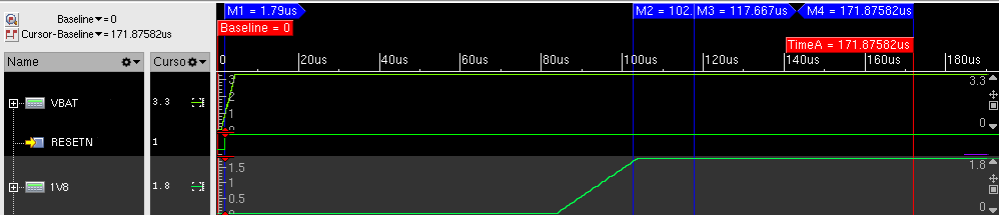
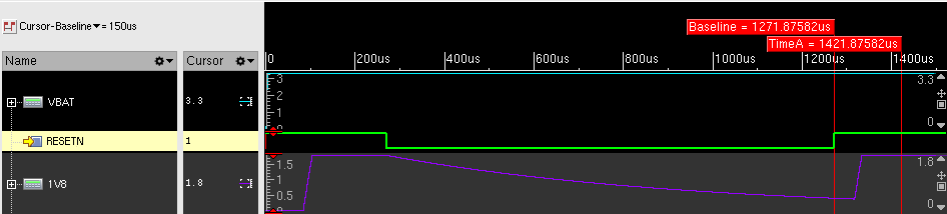
| Module hardware reset signal. Active low. The minimum duration of a reset pulse on the RESETN signal is 100 µs. A 10 pF decoupling capacitor should be placed as close as possible to this pad. | ||||||||
| 16 | RING0 | RING0 | N/A | In/Out | BIDIR | 1.8 V | T to H |
High-Z, T |
| UART0 ring line (RING0, OUT). Enabled by default and active low. Signals the host there are data or URC pending on the UART line. A 100 kΩ pull-up (either on the host input or on the PCB) is recommended as this signal transitions to High-Z when the modem enters deep sleep or shuts down. | ||||||||
| 48 | WAKE0 | WAKE0 | N/A | In | IN | VBAT | N/A | High-Z |
| Wake #0 input line (WAKE0, IN). Disabled by default. When enabled, a high level wakes the modem up from deep sleep mode. Note: there is no current leakage at low level. | ||||||||
| 47 | WAKE1 | WAKE1 | N/A | In | IN | VBAT | N/A | High-Z |
| Wake #1 input line (WAKE1, IN). Disabled by default. When enabled, a high level wakes the modem up from deep sleep mode. Note: there is no current leakage at low level. | ||||||||
| 49 | WAKE2/MODULE_ EMERGENCY_ SHUTDOWN | WAKE2 | MODULE_ EMERGENCY_ SHUTDOWN | In | IN | VBAT | N/A | High-Z |
|
Wake #2 input line (WAKE2, IN). Disabled by default. When enabled, a high level wakes the modem up from deep sleep mode. Note: there is no current leakage at low level. Can also be used to trigger a module emergency shut down (module is turned off without notifying the network). |
||||||||
| 55 | WAKE3 | WAKE3 | N/A | In | IN | VBAT | N/A | High-Z |
| Wake #3 input line (WAKE3, IN). Disabled by default. When enabled, a high level wakes the modem up from deep sleep mode. Note: there is no current leakage at low level. | ||||||||
| 57 | WAKE4 | WAKE4 | N/A | In | IN | VBAT | N/A | High-Z |
| Wake #4 input line (WAKE4, IN). Disabled by default. When enabled, a high level wakes the modem up from deep sleep mode. Note: there is no current leakage at low level. | ||||||||
Analogue to Digital Converter (ADC1)
The characteristics of the ADC1 pin are given below:
| Performance Specification | Description | Value | Unit | ||
|---|---|---|---|---|---|
| Min. | Typical | Max. | |||
| Voltage Range | 0 | 1.8 | V | ||
| Tolerance | Input Referred Offset Error | ± 1 | % FS | ||
| Non Linearity | ± 1.5 | LSB | |||
| Resolution | Effective Number of Bits | 10 | bit | ||
| Dynamic Range | 71 | dB | |||
| Input Resistance | 3.5 | 3.9 | kΩ | ||
| Input Capacitance | 1.4 | 1.7 | 2.1 | pF | |
The ADC1 pin can be used either as a general purpose analogue input, or be part of a special application, such as a SWR meter. Don’t connect the ADC1 pin if not used (no need for resistive or capacitive termination).
RING0 Signal
- Be warned of a pending URC when the UART is active and in online mode.
- Reconnect to the UART to receive URCs and user data.
AT+SQNRICFG command. The user can decide what event triggers
the RING line and how long it remains active.WAKE Signals
Several pins of the module can be used as external wake sources: WAKE0, WAKE1, WAKE2, WAKE3, WAKE4 (USB_EXT_VBUS_VLD), RTS0, RTS1. Additionally USB_D+ and USB_D- can be used to wake up the module using a USB Resume procedure.
- If a wake signal is enabled, active and the platform wants to perform a LPM cycle, this wake signal prevents it to enter the low power state.
- If a wake signal is enabled, active and the platform is in low power, this wake signal wakes up the module.
The AT+SQNHWCFG command can be used to show the wake source configuration and change it.
Please refer to the AT Commands Use Cases document for more information.
In addition, as mentioned above in table Table 15, the WAKE2 pin can be used for emergency shut down.
STATUS_LED Signal
The STATUS_LED signal reports when the module is attached to a network. It blinks when the module is transmitting data.
The AT+SQNHWCFG command can be used to turn this signal on or off and configure the
polarity. Please refer to the AT Commands Reference Manual for details on this command.
PS_STATUS Signal
The PS_STATUS (Power Saving Status) signal reflects the module sleep mode. It is high when the module is active and goes low when the module enters sleep mode.
When the host processor does not support UART hardware flow control, monitoring PS_STATUS together with AT polling is mandatory to ensure no data sent over the UART interfaces are lost.
PS_STATUS can also be used to supply power to antenna switches for dynamic matching, or to power any component that needs to be turned on when the modem wakes up.
TX_IND Signal
The TX_IND signal toggles when the module is in TX mode and the output power exceeds a
programmable threshold. The AT+SQNHWCFG command can be used to turn this signal on or
off and configure the threshold. Please refer to the AT Commands Reference Manual for details on
this command.
ANT_TUNE Signals
AT+SQNHWCFG="antennaTuning"
can be used to activate, deactivate and configure the antenna tuning signals ANT_TUNE0 and
ANT_TUNE1, which in turn drive RF switches to select the proper matching circuit (please
refer to the AT Commands Reference Manual). The corresponding antenna tuning configuration could
be set as follows:
| Bands 12(17), 28 | Band 13 | Bands 1,2(25),3,4(66),5(18,19,26),20 | Band 8 | |
| ANT_TUNE0 | 0 | 0 | 1 | 1 |
| ANT_TUNE1 | 0 | 1 | 0 | 1 |
AT+SQNHWCFG="antennaTuning","enable","0","13,0x1,5,0x2,18,0x2,19,0x2,26,0x2,20,0x2,1,0x2,2,0x2,
3,0x2,4,0x2,25,0x2,66,0x2,8,0x3"
The bands not included in the command are defaulted to 0x00.
Emergency Shutdown / SHTDWN Function
AT+SQNHWCFG="emergencyShutdown","enable",<duration>
enables emergency shutdown. The <duration> parameter represents the final
acknowledgement pulse width (see the AT Command Reference Manual for LR 9.0 document for further
information). If the generation of this final pulse is required, disable the PS_STATUS function
and reconfigure pad 13 as GPIO2:
AT+SQNHWCFG="ps_status","disable"AT+SQNHWCFG="gpio2","enable","normal","output","low"
"low". If GPIO2 is configured as input, or as an output with default
logic level "high", the final acknowledgement pulse will not be emitted. If the
polarity is chosen as "inversed" instead of "normal", the pulse
appears as negative on the pad (1.8 V → 0 V → 1.8 V instead of 0 V → 1.8
V → 0 V).After the module has shut down, it requires a power cycling sequence complying to the timings mentioned below in order to restart correctly.
JTAG
| Pad # | Pad Name | Primary Function | Voltage | Direction | Pad type 22 | Reset State |
|---|---|---|---|---|---|---|
| 69 | JTAG_TCK | JTAG_TCK | 1.8 V | In | IN | In, Pull-down, Schmitt-trigger |
| 67 | JTAG_TDI | JTAG_TDI | 1.8 V | In | IN | In, Pull-up |
| 68 | JTAG_TDO | JTAG_TDO | 1.8 V | Out | BIDIR | Out, 0 |
| 66 | JTAG_TMS | JTAG_TMS | 1.8 V | In | IN | In, Pull-up |
| 70 | JTAG_TRSTN | JTAG_TRSTN | 1.8 V | In | IN | In, Pull-down |
Antenna
| Pad # | Pad Name | Direction | Comments |
|---|---|---|---|
| 90 | LTE_ANT | In/Out | Main Antenna, for Rx and Tx |
Electrical, RF and Thermal Characteristics
Power
Power Pads Characteristics
| Pad # | Pad Name | Supply | Direction | Min Value (V) | Typical Value (V) | Max Value (V) |
|---|---|---|---|---|---|---|
| 8 | 1V8 (see Note above) | 1.8 V | Out | 1.62 | 1.8 | 1.98 |
| 73 | SIM_VCC 23 | 1.8 V | Out | 1.62 | 1.8 | 1.98 |
| 60, 62, 63 | VBAT | N/A | In | 3.3 | 3.8 | 4.5 |
Power-on, Power-off and Reset
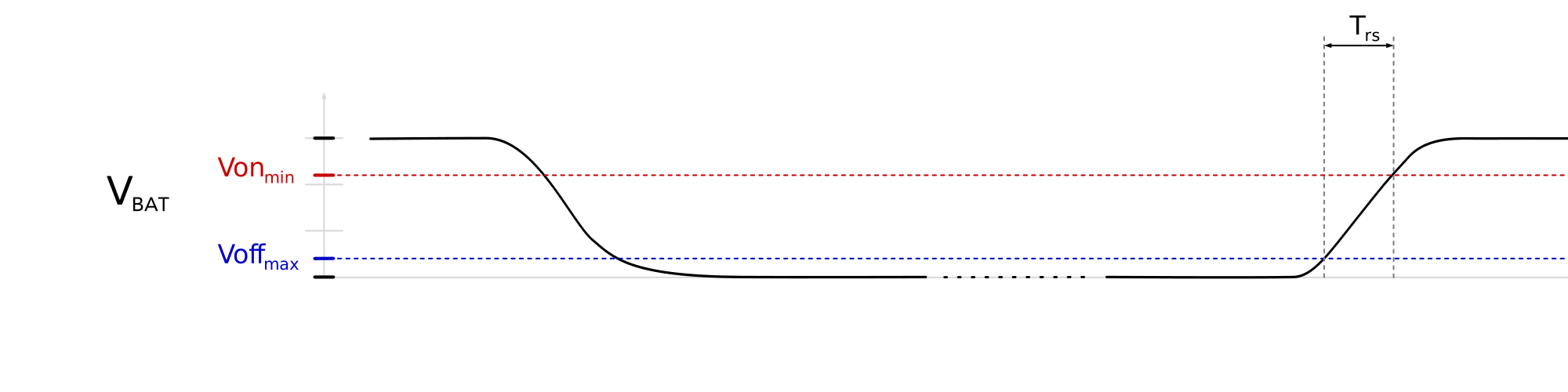
| Name | Description | Min. | Typ. | Max. | Unit |
|---|---|---|---|---|---|
| Vonmin | Minimal ON Voltage | 3.3 | V | ||
| Trs | VBAT Rise Time from Voffmax to Vonmin | 124 | 10 | ms |
| Name | Description | Value |
|---|---|---|
| Toffmin @ 50 mV | Minimal OFF (VBAT ≤ Voffmax) time to insure complete reset when Voffmax = 50 mV | 0.1 s |
| Toffmin @ 0.1 V | Minimal OFF (VBAT ≤ Voffmax) time to insure complete reset when Voffmax = 0.1 V | 0.5 s |
| Toffmin @ 0.2 V | Minimal OFF (VBAT ≤ Voffmax) time to insure complete reset when Voffmax = 0.2 V | 1 s |
Power Down
Module's powering down is typically triggered by the AT+SQNSSHDN command. Once the
+SHUTDOWN URC is received, a small delay must be observed (typically around 1 s)
before switching the power off. Failure to observe this delay might result in data loss (unperformed or
incomplete Flash writes).
Power States
Figure 9 represents the electrical states of the module and their transitions.
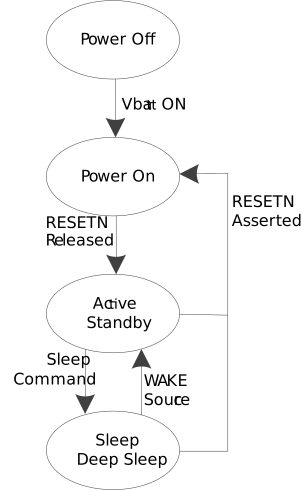
Power modes are described in Table 22 and illustrated in Figure 9.
| Power Mode | LTE Mode | Available Interfaces |
|---|---|---|
| Active | Connected (RF on) | All interfaces |
| Standby | Connected (RF off) | All interfaces |
| Sleep | RRC Idle | WAKE pins (including RTS0/1) |
| Deep Sleep | radio off, airplane mode | WAKE pins (including RTS0/1) |
Test Points and Measurement Access
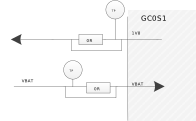
It is recommended to place test points and gaps bridged with 0 Ω SMD resistors on all supply nets to allow for easy voltage and current measurements. The size of the 0 Ω shorting chips should match the width of the supply track, which in turn depends on the current throughput.
Digital I/O Characteristics
This section details the voltage and current characteristics of the various I/O pads of the GC02S1-WW.
- 1.8 V
- VBAT
See Table 23 for the digital I/O characteristics of the different I/O pads. Refer to each interface of the GC02S1-WW in chapter Interfaces for the power group and I/O pad type of each pad. Note that IN pads are inputs only whereas BIDIR can be both inputs and outputs.
| Symbol | Minimum | Maximum | Unit |
|---|---|---|---|
| VIH Input HIGH level | 1.26 | 3.3 | V |
| VIL Input LOW level | 0 | 0.54 | V |
| VOH Output HIGH voltage | 1.44 | 1.8 | V |
| VOL Output LOW voltage | 0 | 0.36 | V |
| IRPU Input pull-up resistor current | 15 | µA | |
| RRPU Input pull-up resistance | 27 | 34 | kΩ |
| IRPD Input pull-down resistor current | 15 | µA | |
| RRPD Input pull-down resistance | 27 | 34 | kΩ |
| VH Input hysteresis | 0.18 | V | |
| IPAD Input leakage current, non-tolerant | -1 | 1 | µA |
| IOZ Off-State leakage current | 1 | µA |
| Symbol | Minimum | Maximum | Unit |
|---|---|---|---|
| VIH Input HIGH level | 0.8 | VBAT + 0.6 (max. 4.5) | V |
| VIL Input LOW level | 0 | 0.2 | V |
| Drive Strength Class | IOH (mA) | IOL (mA) |
|---|---|---|
| T | 1.1 | 1.11 |
| L | 2.2 | 2.25 |
| M | 4.4 | 4.48 |
| H | 6.6 | 6.72 |
RF Performance
RF Sensitivity for GC02S1-WW module
The figures given below are measured at ambient temperature over a 10-MHz bandwidth using a typical 3.8 V power voltage.
| Bands | RF Sensitivity Level (dBm) |
|---|---|
| 1 | -97 |
| 2/25 | -97 |
| 3 | -97 |
| 66 / 4 | -97 |
| 5 / 18 / 19 / 26 | -97.5 |
| 8 | -97 |
| 12 | -97 |
| 13 | -98 |
| 20 | -98 |
| 28 | -98 |
RF Output Power
The GC02S1-WW peak output power within the recommended operating range (from 3.3 to 4.5 V) is given in Table 27.
| Bands | Output Power |
|---|---|
| All Bands | 23 dBm ± 2 dB |
| Parameter | Requirements | Comments |
|---|---|---|
| Antenna Efficiency | > 50% for low bands, > 60% for mid bands | |
| VSWR | < 2:1 | Higher values could result either in poor RF performance, reduced Tx power or increased sideband/harmonic emission levels. Very high VSWRs can permanently damage the power amplifier. |
| Impedance | 50 Ω |
Power Supply Dimensioning
This section provides guidance to designers working on the power supply or selecting a suitable battery to power the GC02S1-WW.
Overview
Figure 11 below shows that no current peaks are observed before the module starts transmitting (both at 40µs and 10ms time division settings).

Peak Current Measurement Method
Sequans recommends to use the setup represented in Figure 12 for peak current measuring. This setup was used to record the measurements presented in Table 29.
- An INA293B1 current sense amplifier is placed close to the module to measure its current consumption.
- A large capacitance array CBAT (680µF × 4) is placed close to the VBAT pin to simulate a battery and screen the device from the parasitic inductance of cables and tracks.
- 2 x 22µF capacitors are placed in between the 0.1Ω precision resistor and the VBAT input of the module to smooth the current peaks out.
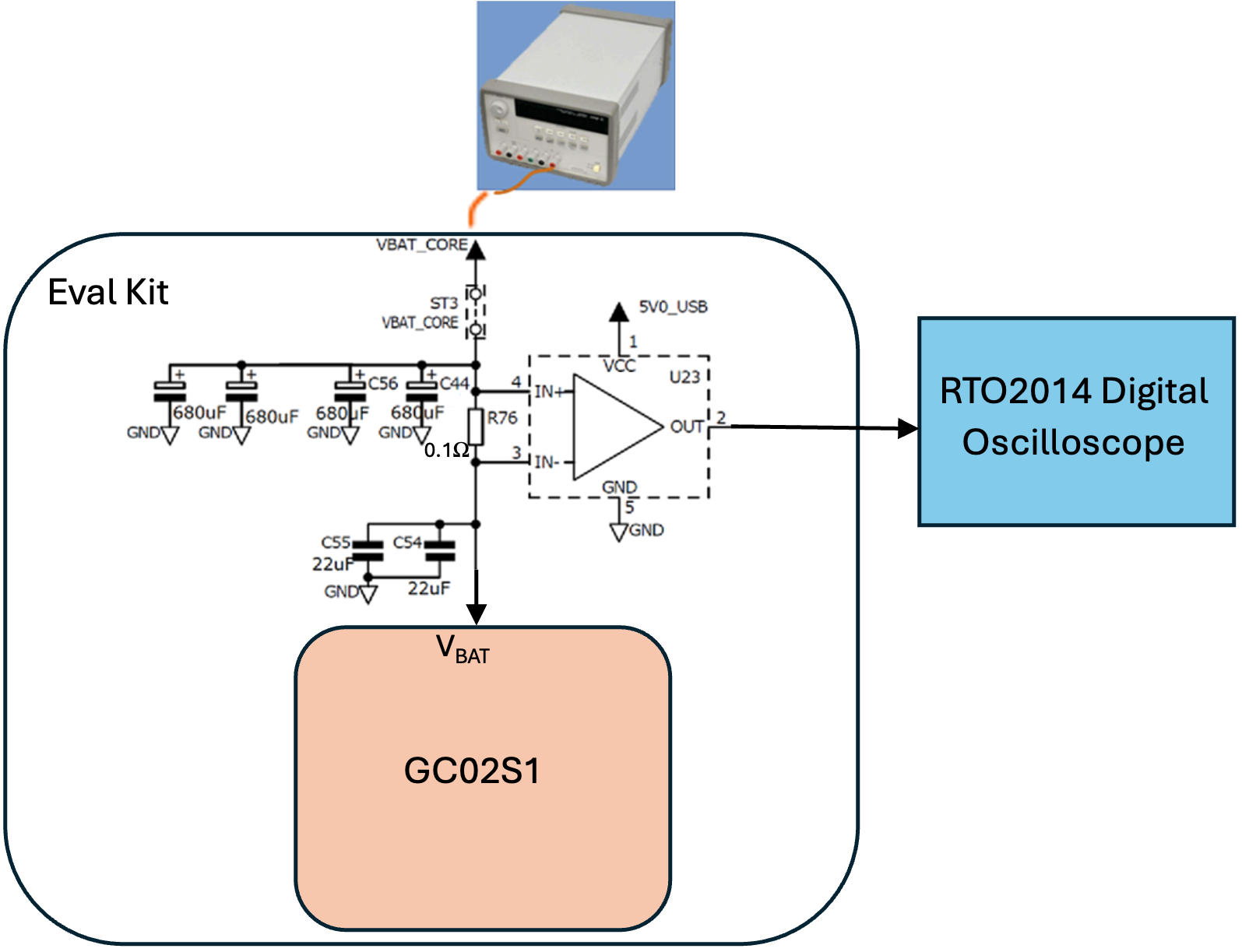
Peak Current Measurement
Table 29 gives the peak current values measured on the setup shown on Figure 12 for different voltages and temperatures.
| Supply Voltage (V) | Ambient temperature | T = +85°C25 | ||
|---|---|---|---|---|
| Low Band | Mid Band | Low Band | Mid Band | |
| 4.5 | 680 | 729 | 727 | 749 |
| 3.8 | 806 | 861 | 859 | 899 |
| 3.3 | 932 | 932 | 969 | 945 |
Safety Considerations: Total Inductance and Capacitance
Hardware Design Recommendations
RF Interface
Circuit Diagram Example
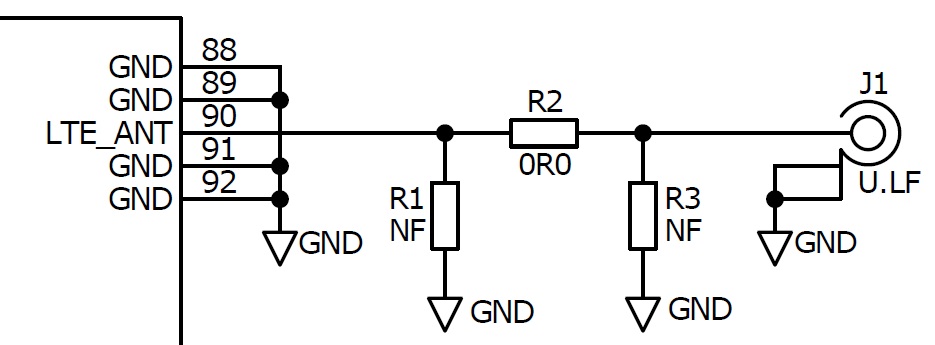
LTE_ANT is the main antenna pin and serves for both TX and RX signals.
Run a 50 Ω transmission line from this pin to the 50 Ω Primary Antenna/Antenna-connector.
As Figure 13 shows, use a π or T-type network for matching, if needed. This document shows π-type networks, but T-type are equally acceptable.
See Antennas and RF Design Considerations for more detail on connecting to these pins and on the π-type matching network and ESD protection.
Antennas and RF Design Considerations
General Considerations
- For optimal RF performance, power tracks should be preferred over power planes.
- RF tracks must always be kept as short as possible.
- Use many ground vias, especially all over ground patches/islands
π-Type Matching
A 3-component π-type (or T-type) matching network is recommended. The three components of the matching network should be laid out adjacent one to another to minimise the interconnecting tracks’ lengths. Use small parts with high Q.
Solder the ground side of the shunt(s) part directly to a ground plane, or use wide and short tracks to minimise the series inductance. The shunt part(s) need not be fitted if matching is unnecessary. The ground plane used for grounding the shunt element(s) of the matching circuit should ideally be the same as the 50 Ω transmission line’s reference ground plane.
ESD Protection
ESD protection is a discretionary requirement and only required if necessary, for higher ESD specifications than those of the GC02S1-WW.
It is recommended to select an ESD device with very low parasitic capacitance and a small size (0201) to avoid impacting the RF impedance.
Standard Impedance Transmission Lines
- If the RF track runs on the outer metal layer:
- Microstrip
- Coplanar waveguides
- If the RF track runs on an inner metal layer:
- Embedded microstrip
- Stripline
- Pay attention that the maximum insertion loss between the RF pad and the antenna must be kept under 0.5 dB
- Transmission lines EM fields extend beyond the RF track and couple to adjacent layers:
For microstrip, the lateral gap running along the track must be at least twice the thickness between the track and its underlying ground plane.
Both in microstrip and co-planar cases, adjacent metal areas must be present and be properly connected to the main ground plane, so as to terminate the fringing EM fields.
Figure 14. Transmission Line Implementation Examples 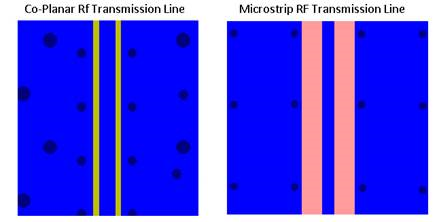
Figure 14 provides examples of both transmission line implementations, specifically showing:
- The distance between the transmission line and the side-running grounded area on layer 1.
- The periodic via connections connecting the top metal layer to the reference GND layer of the transmission line.
- Avoid routing noisy signal tracks along the RF transmission lines to minimize cross-coupling into GC02S1-WW ’s RF ports.
- The component pads of the SMD parts used in the 3-component π-type matching circuit are effectively very short transmission lines. To minimise the RF insertion loss (s11 , VSWR) caused by the width step, use tapered ends.
ANT_LTE Specific Footprint Design
The ANT_LTE pad must be considered as a short transmission line whose width is the same as the pad’s width. To minimise discontinuity, the ground layer immediately below the pad must be cut out as shown in Figure 15 . Use a quasi-static (in coplanar wave mode) or full-wave EM simulator to compute the extent of the underlying ground area that needs to be removed in order to reach the 50 Ω goal impedance. The recommended clearance between the ANT_LTE pad and the ground plane underneath is 200 µm.
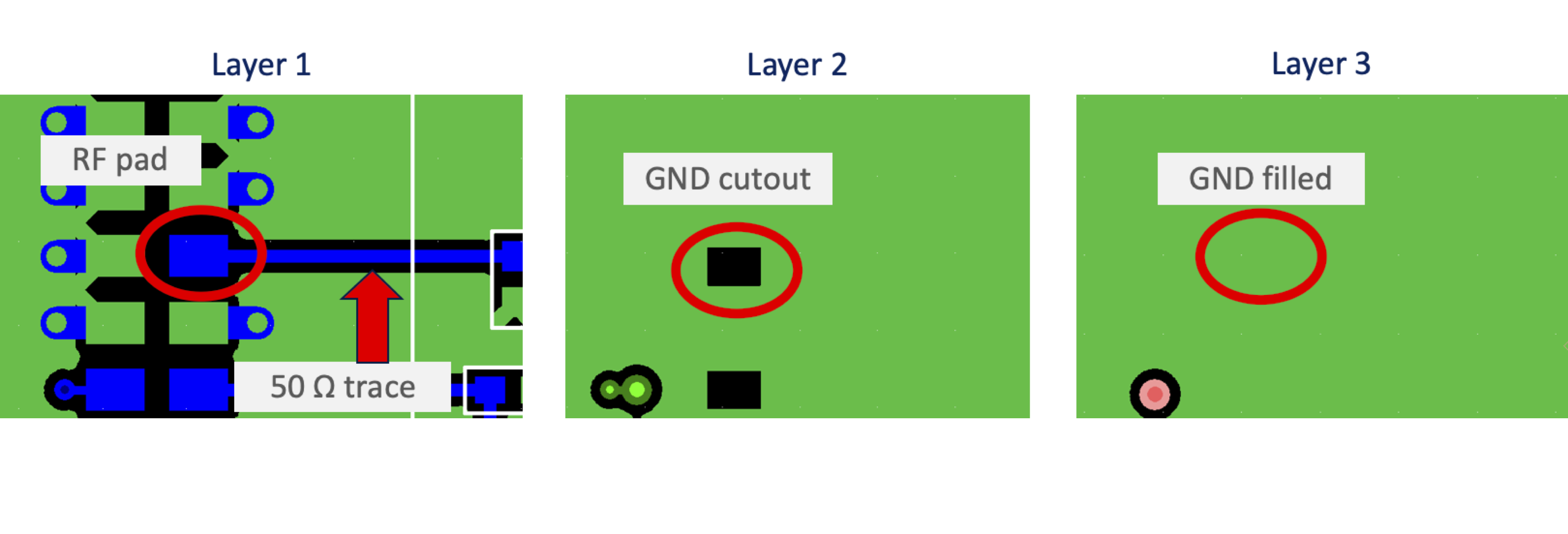
Because the RF pad is not located on the edge of the module, the section of the RF track that lies under the module must run straight out and be orthogonal to the module’s edge.
Antenna Matching Circuitry
The GC02S1-WW supports antenna matching. An example implementation is provided in the Calliope 2 reference design that uses two switches and an inverter. Signal matching uses the ANT_TUNE0 and ANT_TUNE1 signals as shown on Figure 16. Please also refer to the schematics of the latest GC02S1-WW EVK.
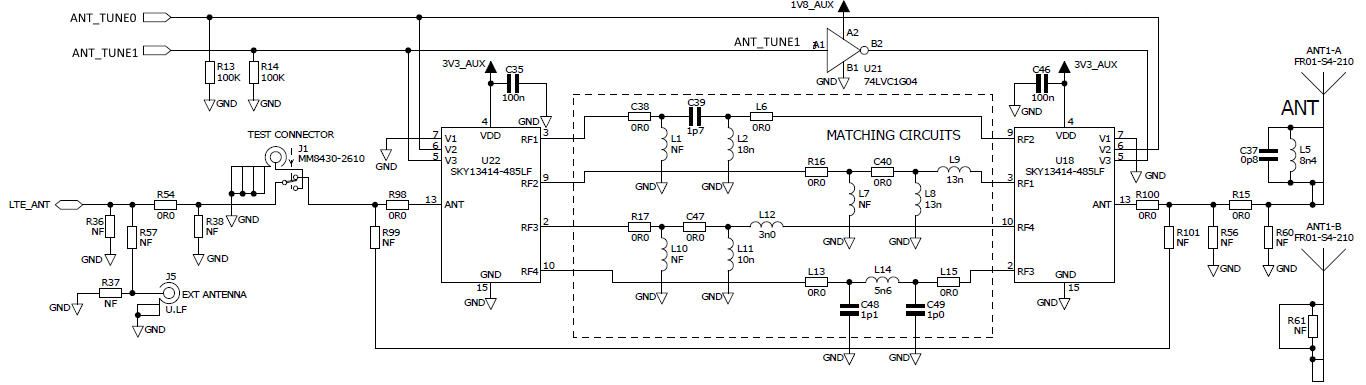
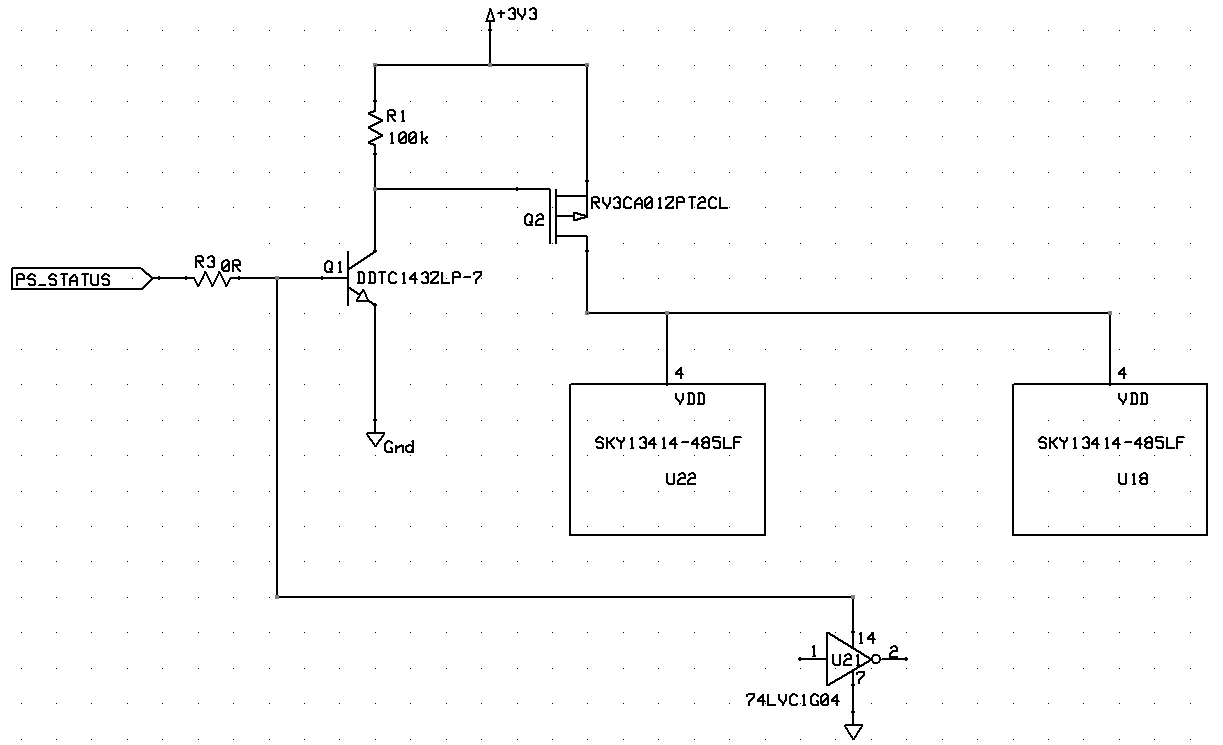
In this implementation, the switches and the Antenna Matching Circuitryinverter are always on. To improve the power consumption, use PS_STATUS to turn the power supply of both switches and the inverter either on or off, as illustrated in Figure 17, where the external ICs are switched off when the module is in low power mode.
Test Points and Measurement Access
Engineering and Production teams need 50 Ω termination points, for example J1 in Figure 13, for the assessment of the RF performance.
It might be needed to check the RF path and/or optimise the π-type matching network. This involves measurements from the pin #90 (LTE_ANT) down to the 50 Ω RF connector. To carry out measures at the pin 90, a coaxial cable (usually Ø 1.25 mm semi-rigid) can be attached to it. It is crucial that a grounded area be available on the top layer next to LTE_ANT (GND pads are typically sufficient) to ensure good RF ground continuity and provide strong mechanical attachment of the coaxial cable itself.
Please refer to Antennas and RF Design Considerations for more detail on RF track design.
PCB Layout Rules
This section provides general PCB layout good practices.
Placement
- The GC02S1-WW module itself
- The RF interface
- Keep the tracks in the same quadrant than the interface they connect to.
- Consider orientation to avoid track crossing when routing.
- Keep the parts as close as possible to the GC02S1-WW module where possible.
- Remember that a patch/on-board antenna radiates EM power that can interfere with the proper functioning of the parts located in its vicinity. Keep sensitive devices as far away as possible from the antenna.
- Place as many ground vias as possible underneath the module in order to insure both excellent electrical grounding and thermal conduction (see section Thermal Considerations)
- Add test points for critical signals such as UART2 and the FFF_FFH pad.
- Reserve space for pull-ups (especially on UARTs CTS/RTS and SIM interface signals).
PCB Layers
Use more layers, for example 6 instead of 4, to increase the freedom in burying and shielding RF traces and noisy signals. A 6-layer PCB design fits the need of an evaluation board that contains many signals, . Conversely, a 4-layer PCB design should implement only a minimal set of signals .
Track Design Advice
This section explains some standard design rules applicable to the different types of signals (digital, power supply, RF).
General rules
- Every track is a potential spurious antenna, especially if open-ended. Never route unneeded signals, and keep the tracks as short as possible
- If a track cannot be shortened, try and bury it.
- Manage a large clearance around RF tracks
-
Avoid ‘via stubs’, use through-hole vias only when connecting tracks running on the top and bottom layers. In all other cases, use blind or micro vias.
Figure 18. Via manufacturing recommendations 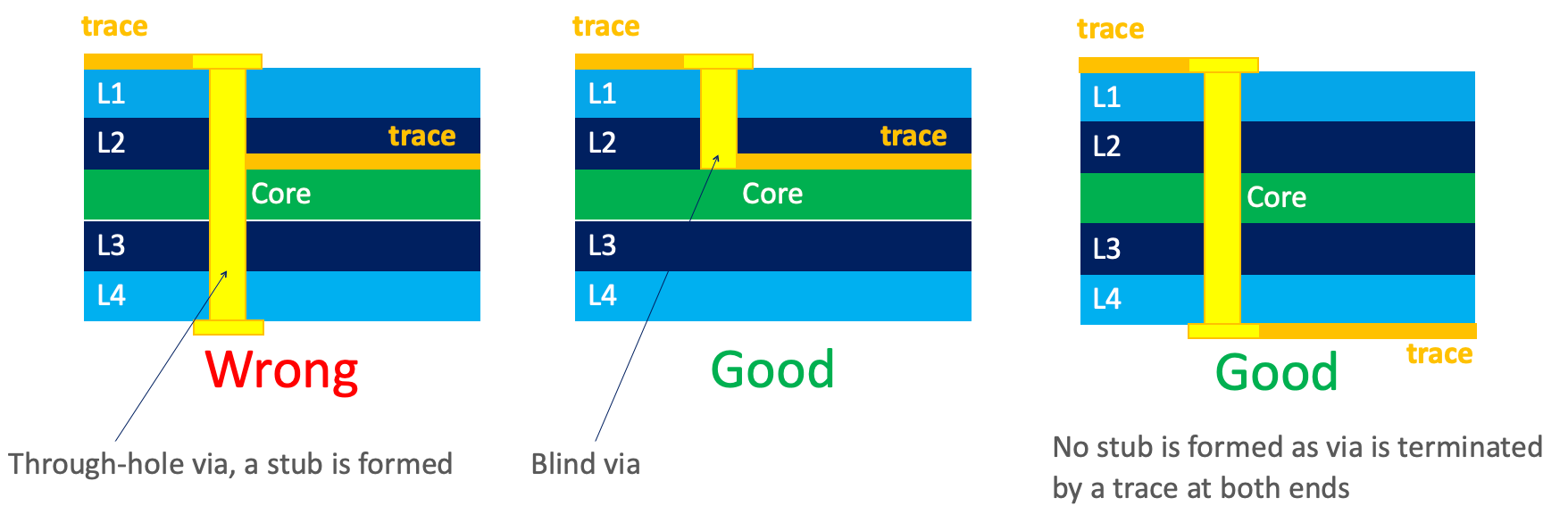
Digital Tracks
- Careful and sensible placement of digital signals is required to minimise cross-coupling between tracks.
- Pay attention to ground currents during routing. Make sure that the grounding surrounding the tracks (from source to load) remains continuous, with no notches or gaps. Long and/or winding ground return currents can create EMI problems.
- Ensure the tips listed in Section Controlled Impedance Tracks are taken into account for digital tracks requiring specific impedance. This is especially the case for USB data tracks (USB_D+ / USB_D-) which require 90 Ω differential impedance, with shielded ground planes in adjacent layers (shielded coplanar type tracks).
- Keep digital tracks with no impedance needs thin to avoid a buildup of capacitance, while keeping them within manufacturing constraints.
- If tracks are routed one atop the other, keep them orthogonal. Alternate layer tracks’ direction to minimise cross-coupling.
- Important recommendations related to SIM connector placement can be found in the section SIM Recommendations .
- Shield the clock signal vias.
- The top and bottom layers should be filled with ground planes interrupted with the minimal number of tracks.
- Bury as many tracks as possible, especially data (UART, etc) and clock tracks. If it is not possible to bury everything, leave only static signals (such as reset, etc) on the external layers.
- A few signals can be further filtered, although this is not typically necessary. These
signals are:
- 1V8_LTE, with a π filter. The default BOM has a 0 Ω series resistor.
- All SIM signals, with decoupling capacitors placed as close as possible to the SIM connector (not fitted by default).
- The ANT_TUNE lines controlling the antenna switches, with RC filters. The default BOM has a series 0 Ω resistor.
- The tracks between the SIM connector and the GC02S1-WW should be kept as short as possible, and away from the antenna.
- Data and clock signals should be routed as far as possible from the antenna area.
Power Supply Tracks
- Size the power supply tracks appropriately to provide a low resistance, low impedance source: the recommended width of the VBAT signal must be greater than 1 mm. Pay attention to the number of vias used when routing tracks across multiple layers, as they add spurious series resistance. This is especially true for high current signals such as the power amplifier supply voltage.
- The decoupling capacitors ground pad of each power supply signal must be connected to the ground return of the source.
- Keep digital tracks well away from the power supply tracks.
- The VBAT track must be located as far away as possible from the RF section.
- Sequans does not recommend power planes for this design.
SIM Tracks
Some designers insert serial resistors between the GC02S1 SIM pads and the SIM tray interface. These resistors are in no way mandatory, but in case the designer insists on adding them, their value must not exceed 33 Ω or the interface risks malfunctioning. Care must also be taken to avoid excessive series resistance if an EMI filter is placed on the SIM_VCC signal.
RF Tracks
- Avoid burying these tracks as much as possible, because it increases RF losses w/r to top/bottom routing.
- Keep tracks as short as possible to help reduce RF losses.
- Try to mitigate impedance discontinuities. Use tapered ends to improve the matching with SMD pads.
- Ensure the steps provided in Section Controlled Impedance Tracks are taken into account when setting the track width.
Controlled Impedance Tracks
- Calculation of tracks width and spacing:
Use simple RF design tools to compute the track’s width based on:
- The thickness of the dielectric substrate lying between the RF track and its associated ground plane.
- The spacing between the track and the adjacent ground plane (on the same layer).
- The dielectric constant of the PCB substrate material.
- Use of a thicker substrate.
- Moving the reference ground plane further down.
-
In general:
- Careful placement is required to keep RF tracks short and straight.
- Do not route RF tracks on buried layers.
- Ground planes beneath RF tracks should be continuous.
- The ground plane running along the RF tracks should be kept distant enough to not alter the track’s impedance.
- RF matching component footprints:
Use tapering to minimise impedance mismatch at the end of tracks. If the parts are significantly wider than the transmission lines, the ground reference should be lowered.
Grounding
- RF ground planes should be as large and continuous as possible and not be cut into chunks. Check that strings of signal vias do not inadvertently create slots in ground.
- Apply ground plane flooding on all layers.
- Apply extensive via stitching. Make sure to scatter the vias evenly over the ground planes.
- Use extra vias around sensitive areas such as RF tracks and noisy lines.
- Stitch tight all along the board edges to create a Faraday’s cage.
- Ground connection between the GC02S1-WW, the customer's application board and the power supply must be direct and as short as possible. Ground islands must be avoided.
Thermal Considerations
This section summarises important design requirements about thermal dissipation. Unless the board is meant to be used in a cold environment, designing for an efficient thermal flow is critical. The temperature of the module, measured by the embedded thermistor, must always remain within acceptable limits (85°C), especially when the product operates at its maximum permissible ambient temperature in a closed, not vented box.
Module Grounding Pads
- All Gxx pads must be tied to a large ground plane which serves as a thermal sink
-
That ground area below the Gxx pads must be stitched with through vias, which conduct heat towards the opposite side of the board
-
Besides, adding blind vias surrounding the Gxx pads area help spread the heat flow evenly amongst layers
-
If a metal casing is used, it should ideally be in tight contact with the bottom ground layer so as to serve as a terminal heat sink
-
If these measures cannot be implemented, or do not suffice, additional elements such as heat sinks, fans or thermal grease (GapPad™) can be used.
Example of a 6-Layer PCB Design
- Top Layer
- Reserved for RF signals. As few other signals as possible. The rest is a ground plane without islands.
Figure 19. Top Layer View 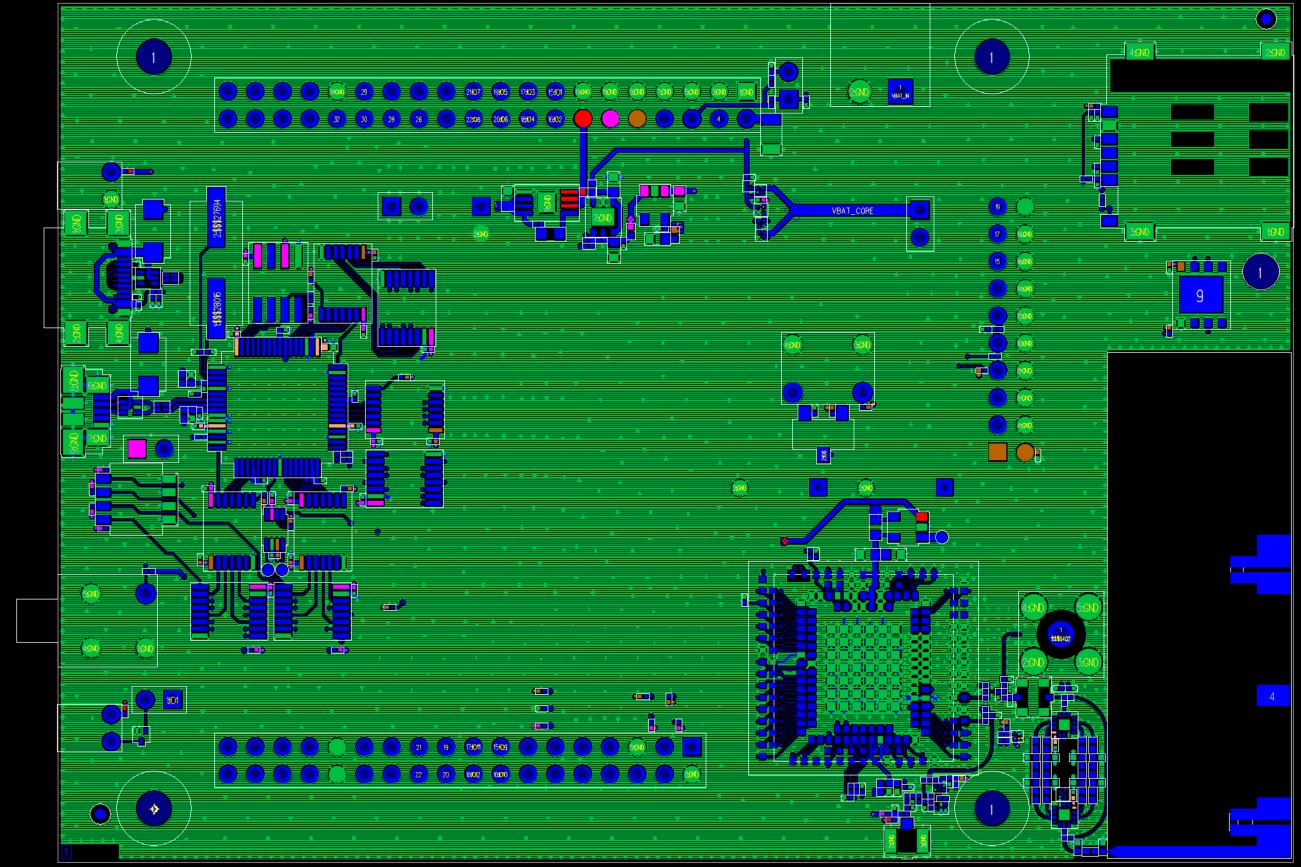
- Layer 2
- Ground plane, no signal
- Vias are evenly distributed across the surface
Figure 20. Layer 2 View 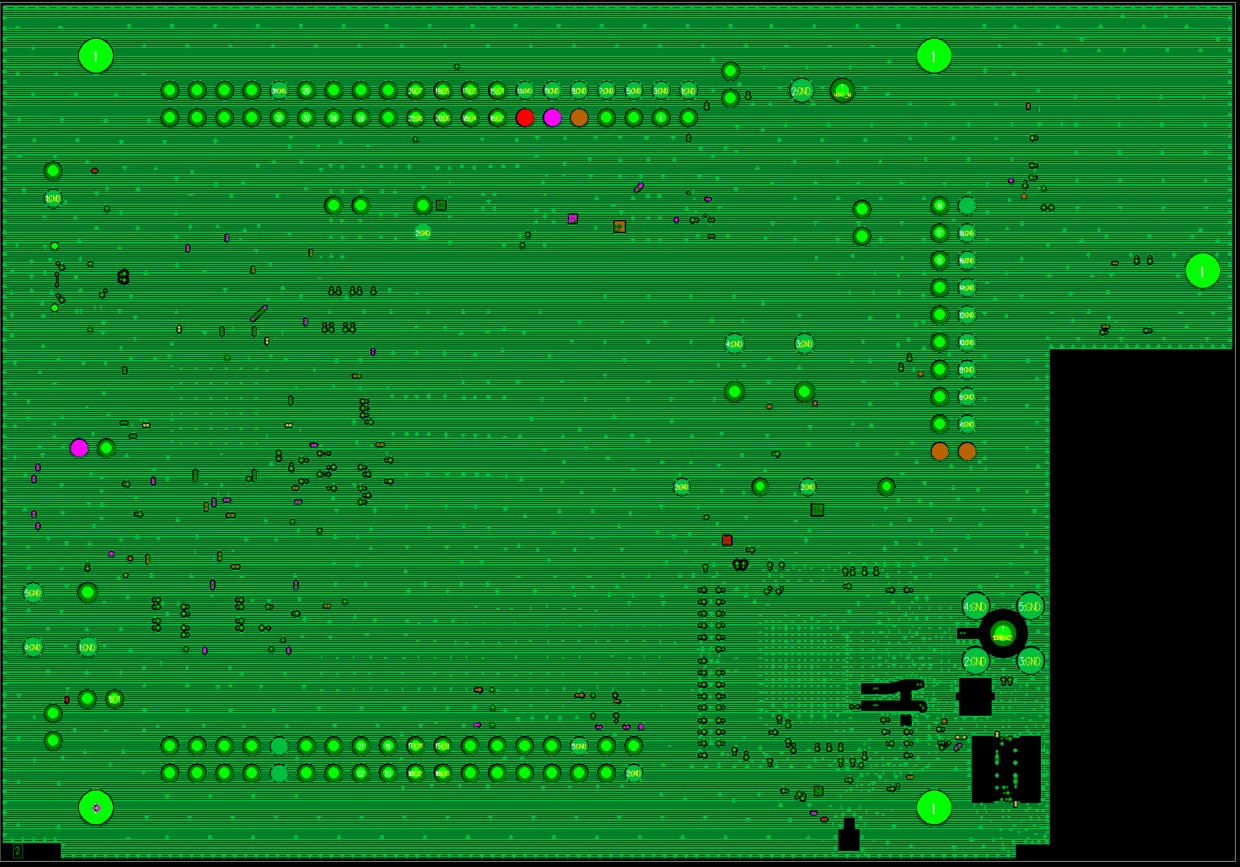
- Layer 3
- Power traces
- The remaining space is flooded with ground with proper stitching and even via distribution
Figure 21. Layer 3 View 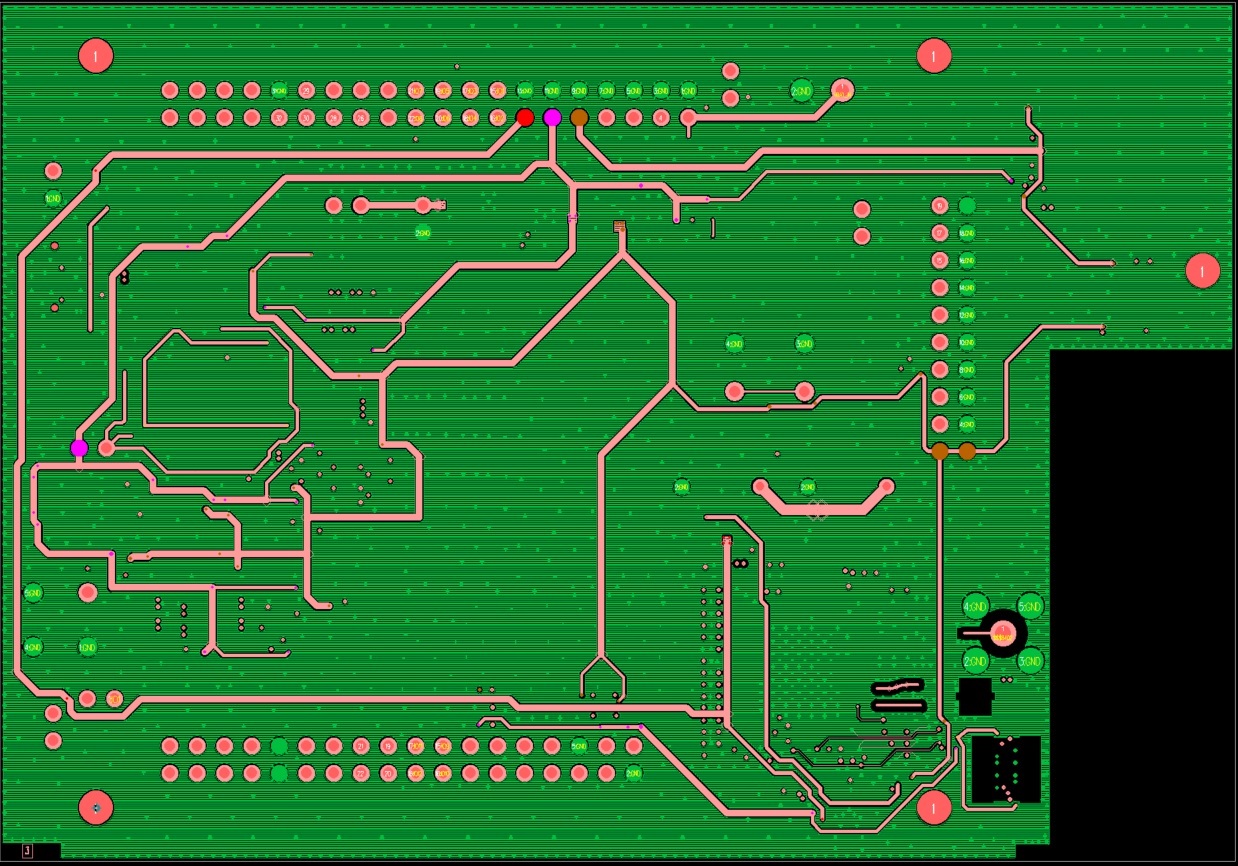
- Layer 4
- Signal layer
- All signals are routed vertically on this plane, if possible
- The remaining space is flooded with ground with proper stitching and even via distribution
Figure 22. Layer 4 View 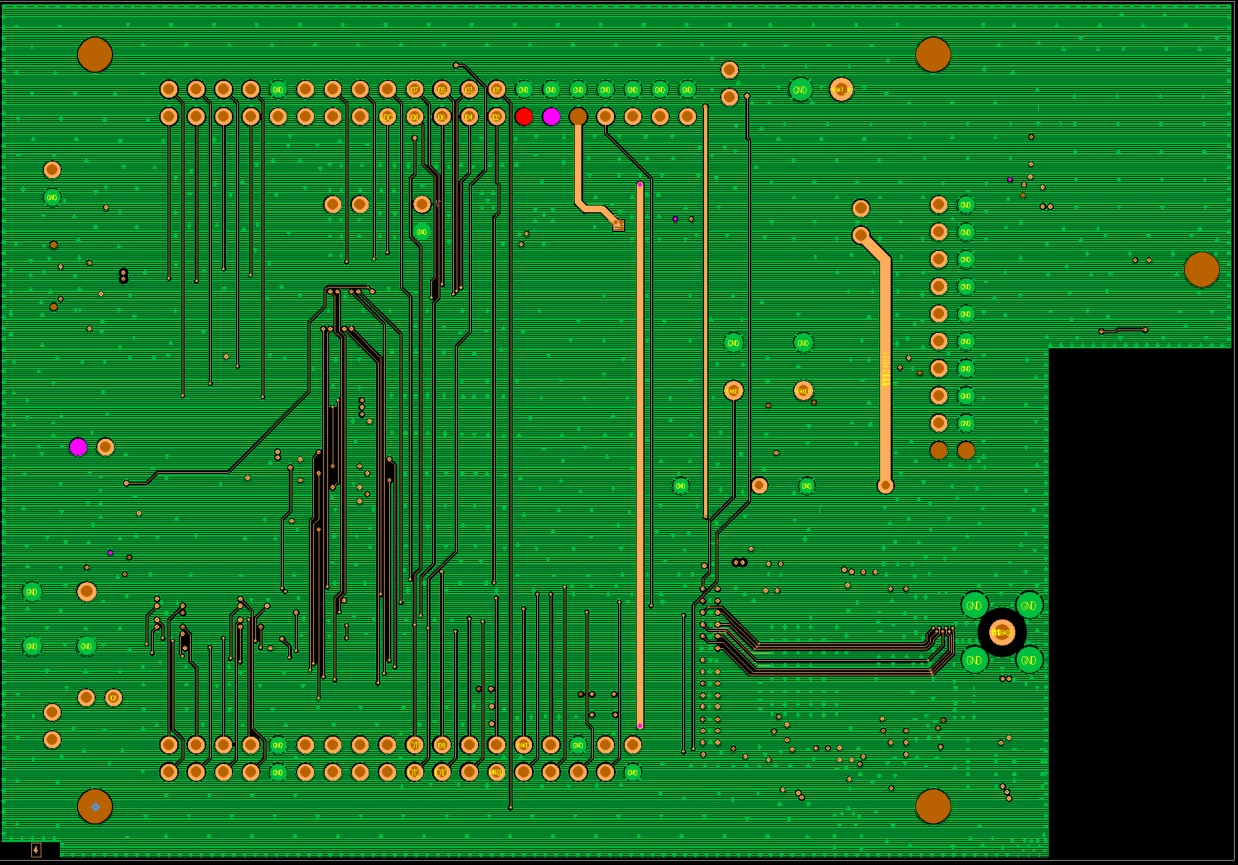
- Layer 5
- Signal layer
- The signals are routed horizontally, to minimise cross-coupling with layer 4
- When this is not possible, precautions are taken to ensure that no layer 4 signal runs atop a layer 5 track
- The remaining surface is flooded with ground with proper stitching and even via distribution
Figure 23. Layer 5 View 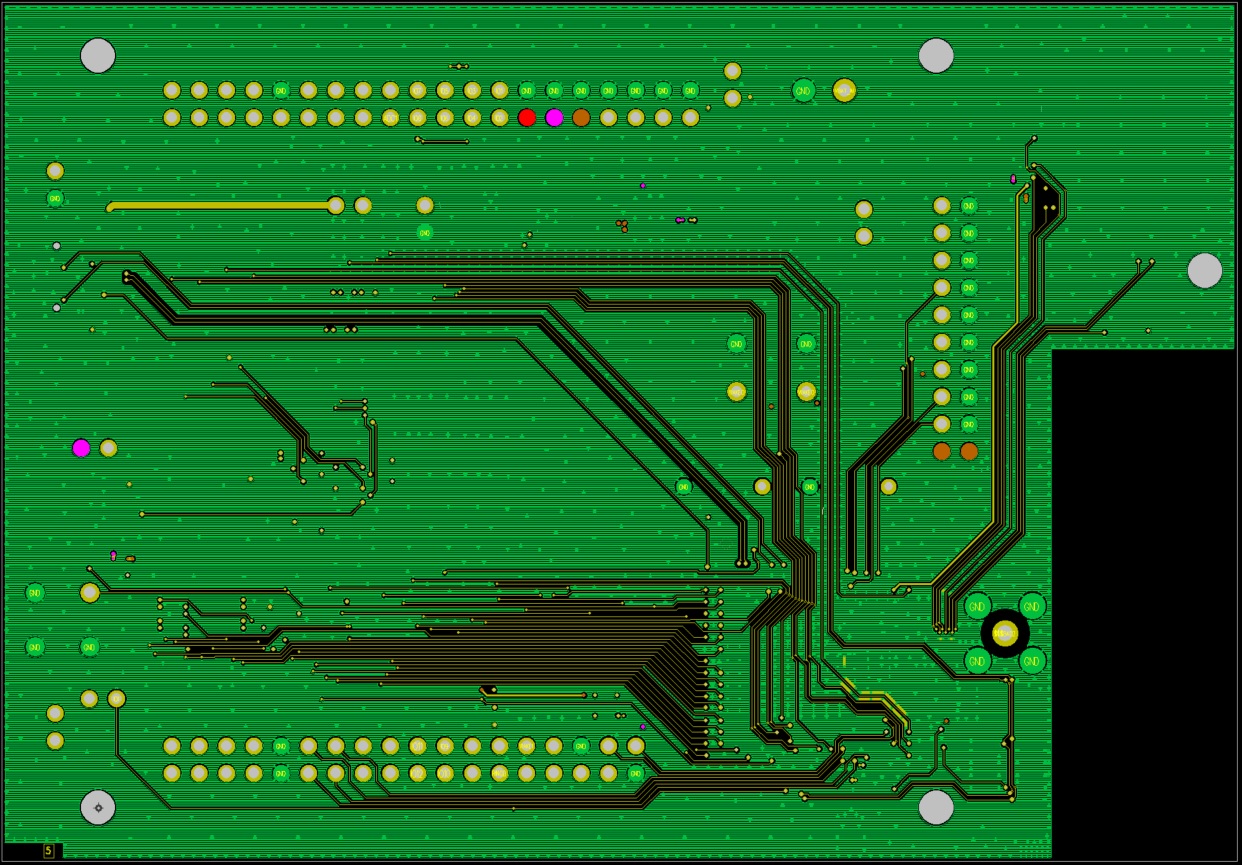
- Bottom Layer
- Minimal signal traces
- Ground plane flooding with a lot of ground stitching (in green)
- The red colour represents 5V0_USB, pink 3V3_AUX, orange 1V8_AUX
- Vias are evenly distributed across the surface
- Tight stitching around the board edges (Faraday’s cage)
Figure 24. Bottom Layer View 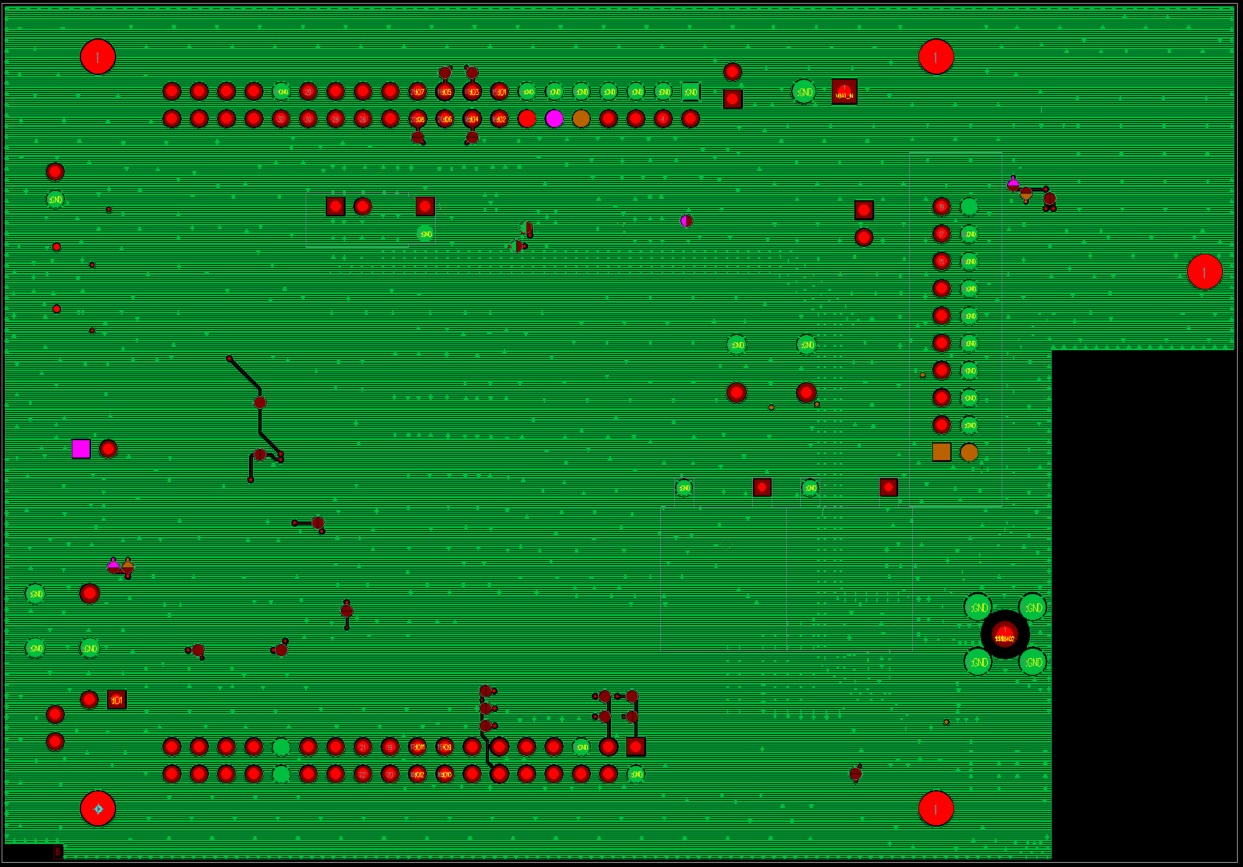
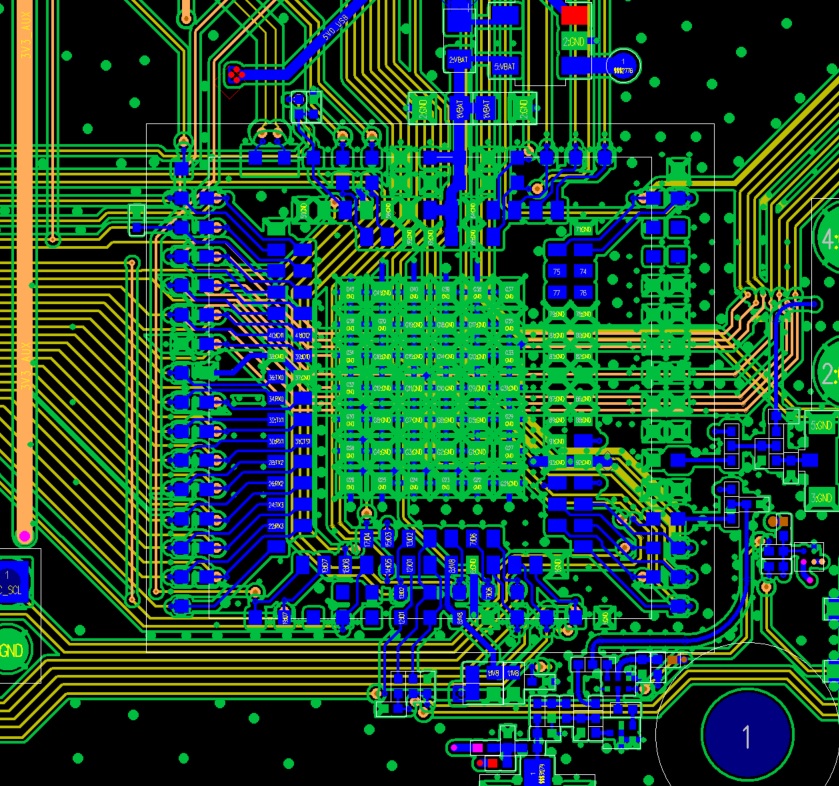
Signals are transferred from the module pads (L1/blue) to the other layers as close as possible using blind and buried vias. Many ground vias are used below the module and around the module to ensure a proper return path to the main ground plane on L2, and aid in thermal dissipation.
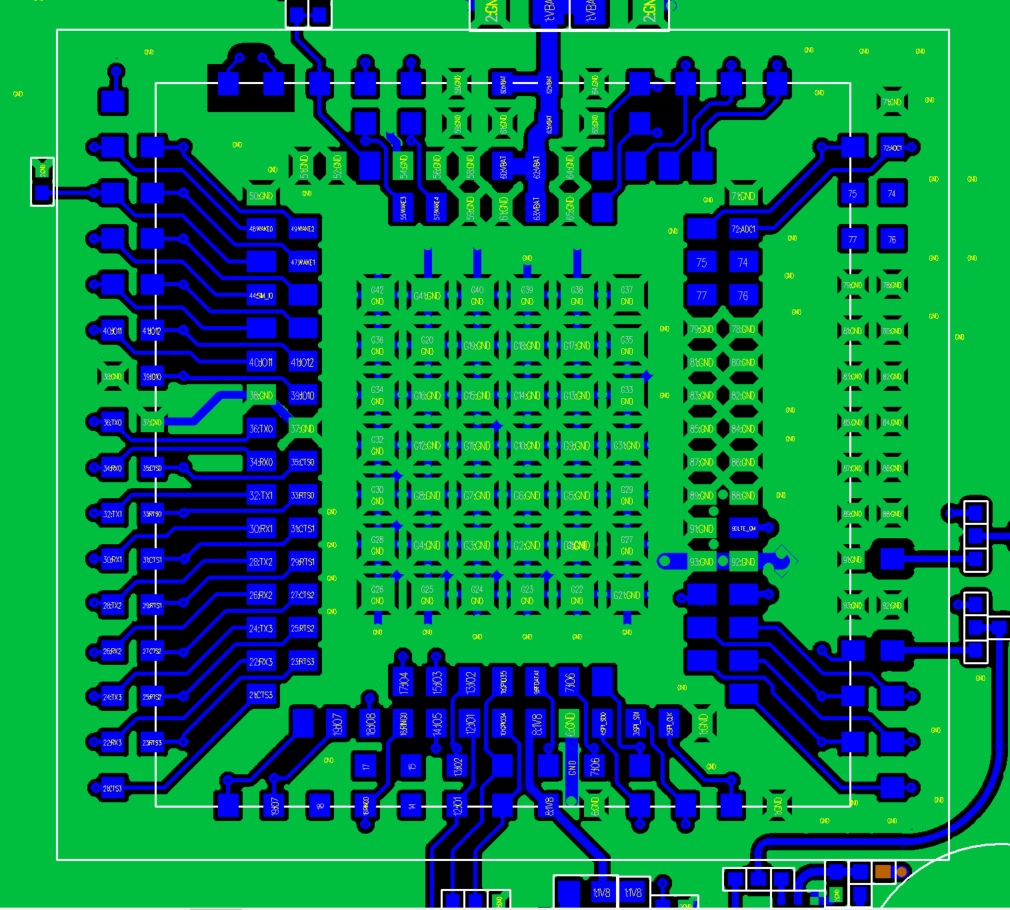
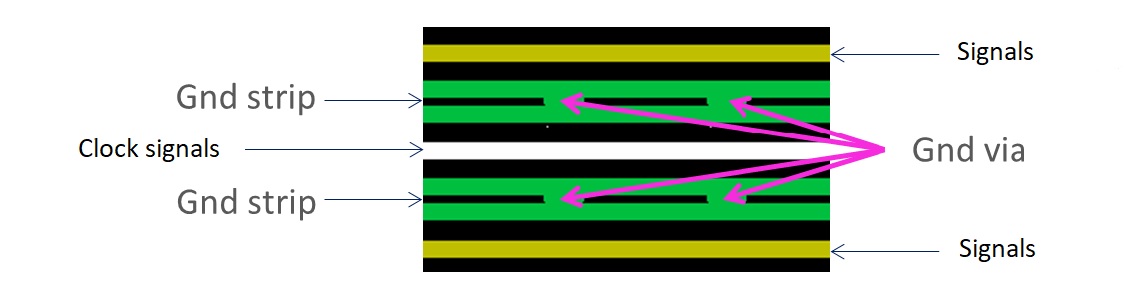
Even if all traces are buried between ground planes, clock signals are also shielded with ground strips. This can be seen on Layer 5, cf. Figure 27.
Hardware Test Preparation
LTE RF Test Preparation
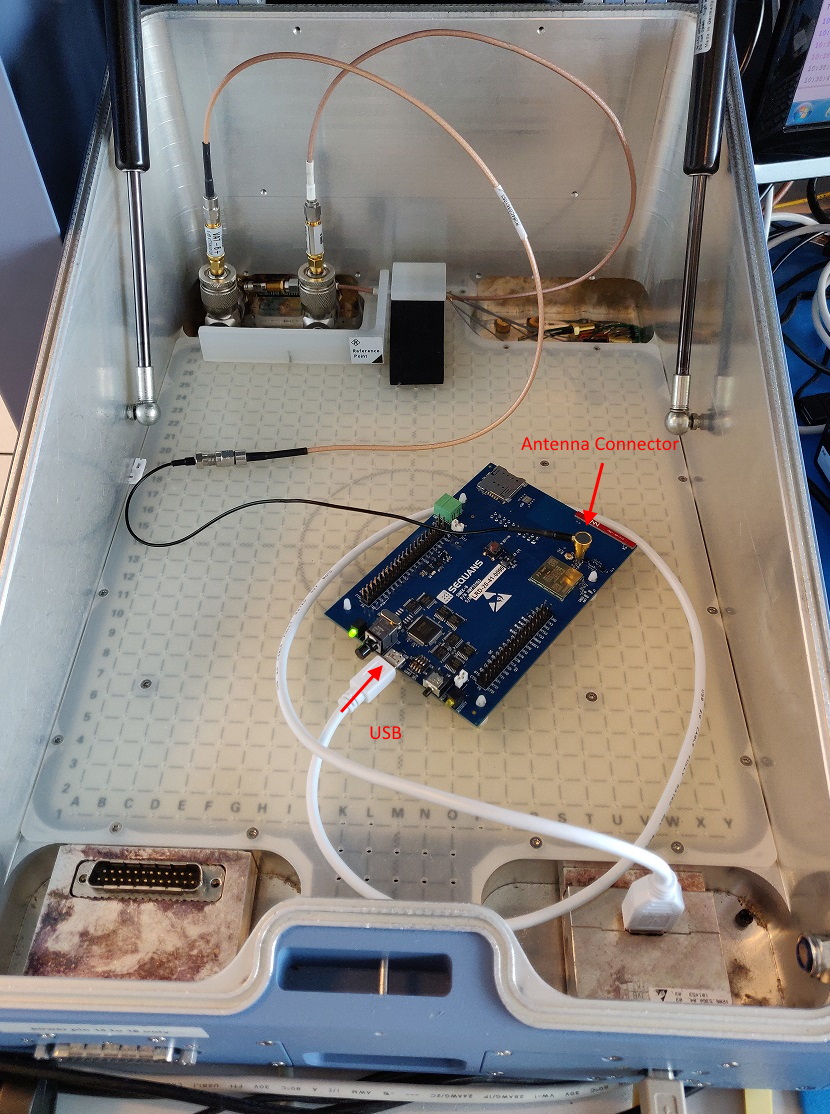
To ensure that the RF test platform provides the most reliable interface for testing, the following setup is recommended for measuring RF characteristics of the GC02S1-WW system.
- The DUT is connected to the computer using the UART 1.
- The DUT is also connected by one RF cable.
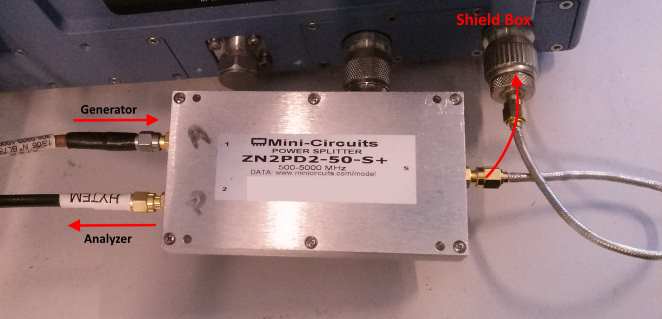
- 1 x ZN2PD2-50-S + power splitter if the signal analyser and the signal generator are two distinct equipments. R&S® CMW100 or CMW500 for instance allow the use of a single bidirectional RF port and obviate the need for a power splitter.
- 1 x RF cable to the MXA (if needed)
- 1 x RF cable to the MXG (if needed)
- 1 x RF cable to the DUT (in the shield box)
USB and Power Interfacing
A customer board must provide a mean to connect GC02S1-WW USB data interface to a laptop/desktop, while disconnecting it from the on-board host processor (if any) on customer's board. This is mandatory to bring-up GC02S1-WW and start RF tests.
A rewiring of the USB connector is required to provide power to the GC02S1-WW board.
The aim of this rework is to avoid any laptop power supply issue by using an external power supply on Vbus.

- Disconnect GC02S1-WW USB data pads (USB_D+ / USB_D-) from on-board host
- Connect them to the USB 2.0 connector of an external laptop/desktop
- GND shall be connected to customer board and laptop/desktop
- Vbus comes from either an External Power Supply unit of local GC02S1-WW host Supply
Bring-Up and Testing
Introduction
The purpose of this chapter is to describe board bring-up, test and qualification.
The expectations at this stage are:
- Any inconsistent and potentially hazardous manufacturing faults must be eliminated.
- Clearance to proceed with further detailed calibration and measurements.
- Evaluate the board’s performances.
Prerequisites
- Checking for RF losses between the GC02S1-WW RF ports and the board’s RF output.
- A sanity check of the connections to the GC02S1-WW.
- Debugging, if necessary.
- An external Host PC / Laptop for monitoring the UART 1 interface.Note:Detailed information will be provided in a future revision of this document.
- LTE RF test equipment:
- A shielding box to avoid any RF interference caused by the environment.
- RF components such as: cables, splitters, 50 Ω dummy loads.
- A power supply with ammeter.
Power Supply
Test Procedure
Figure 31 presents the necessary equipment and the configuration to perform the power supply test.
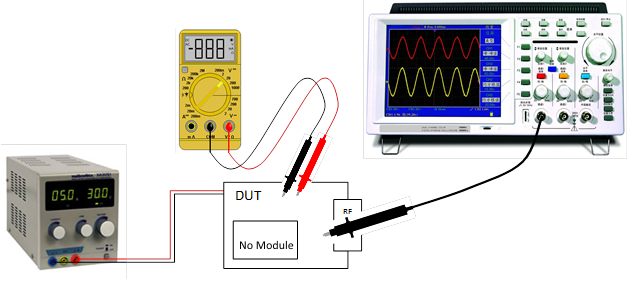
Test voltage values: test the voltage delivered by the power supply with an oscilloscope before connecting the DUT. The voltage level must be correct and ripple-free. Once this is checked, the DUT can be powered and the test points’ voltages measured with a multimeter. At this stage, only VBAT1 can be tested.
Check at each voltage test point, as illustrated on Figure 32, that the voltage value corresponds to what is expected. The value of VBAT1 must be in the range specified in the GC02S1-WW Data Sheet, section Electrical Operating Conditions.
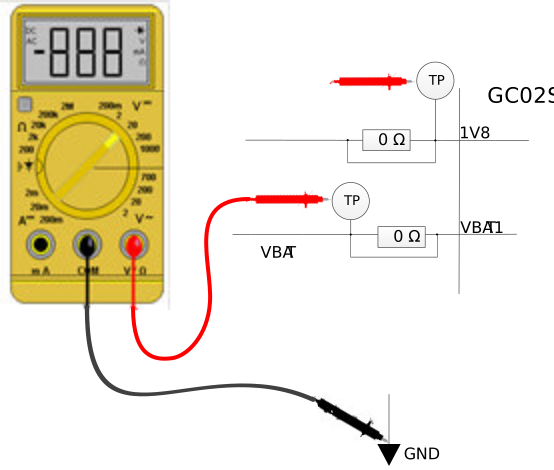
Troubleshooting
If the VBAT1 voltage is incorrect, check any resistor link to detect unexpected short or open circuits.
Confirm Module Power-Up Operation (UART 2)
An extract of the output of the OS console on UART 2 port is provided below (boot in FFF mode):
[0000000000] boot: Switched to flash, timeout 10000, proto thp
[0000000000] Running on Windbond flash sector 0x1C018000
[0000000000] RBRacoon 11.11@64123 '9.0.6.1 [64123]'
[0000000004] Reset cause 'BUTTON'(real 'BUTTON' ) (bootWDG : '0') [rawRst '0x00000001']
[0000000012] regConfig 0xF787FFFC@1
[0000000015] boot: Current flash, timeout 10000, proto thp
[0000000020] boot: FFF mode
[0000000233] elf: ELF format selected
[0000000236] elf: Header finished
[0000000239] elf: Waiting for 512 bytes
[0000000243] elf: PH 0x00000000, 28 bytes
[0000000246] elf: Note 0x63727A04
[0000000249] elf: PH 0x00000000, 20 bytes
[0000000253] elf: Note 0x4D415000
[0000000256] elf: PH 0x00001000, 86 bytes
[0000000260] elf: PH 0x00001060, 3392 bytes
[0000000264] elf: PH 0x00001DA0, 150056 bytes
[0000000272] elf: PH 0x000267C8, 8 bytes
[0000000276] elf: PH 0x000267D0, 56 bytes
[0000000279] elf: PH 0x00026808, 112 bytes
[0000000283] elf: PH 0x00026878, 732 bytes
[0000000287] elf: PH 0x00026B54, 3132 bytes
[0000000291] elf: PH 0x00027790, 20 bytes
[0000000295] elf: PH 0x00416EF4, 276 bytes
[0000000298] elf: PH 0x0069C000, 6016 bytes
[0000000302] elf: PH 0x00EB0000, 16 bytes
[0000000306] elf: PH 0x00F90000, 335712 bytes
[0000000319] elf: PH 0x0069A000, 8192 bytes
[0000000323] elf: Program Header finished
[0000000327] sbp: no ACPU found
[0000000330] sbp: MCPU Booting at 0x1C0E0320...
user: Loading application
resetReason = BUTTON
fs: Mounting /flash0...done
fs: Overlay filesystem mounted on /fs
Could not restore wolfSSL tickets(err=0)
ps status my friend
>INFO> DCP : Init over='serial'
[DEV/IPNSI/DBG](006b36e4)       ipNsiSetPacketThresholds[1824]:Setting mtu size to 1528 bytes
usb_ready (error): GPIO usb_ready not found
eem: Memory initialized
[PSP] initializing
fs: Mounting upgrade filesystem ...
fs: Mounting done
QKI pools init...done
feeds: 630  Configure enter EAPPS
feeds: 650  Configure leave EAPPS
feeds: 650  Configure enter MQTT
feeds: 650  Configure leave MQTT
feeds: 660  Init enter EAPPS
feeds: 720  Init leave EAPPS
feeds: 720  Init enter LWM2M
feeds: 720  Init leave LWM2M
feeds: 720  Init enter MQTT
feeds: 730  Init leave MQTT
feeds: 730  Init enter IMSSTACK
feeds: 730  Init leave IMSSTACK
feeds: 730  Init enter IMSCLIENT
feeds: 730  Init leave IMSCLIENT
feeds: 730  Init enter SQNSMS
feeds: 740  Init leave SQNSMS
[PSP] initialized
[PSP] starting
reserved room 25/512
uart_config (error): Failed to set configuration persistent for /dev/acm0
uart_config (error): Failed to set configuration persistent for /dev/acm1
::hell terminal::
-> [ZSP0] started after 1 ms, version 6.0
[ZSP1] started after 1 ms, version 4.1
ue: Waiting for LCPU IRQ...done
xpc (mcpu): Initalized
xpc (lcpu): Initalized
done
LPU boot confirmationDLP to start...done

ue: Waiting for LCPU to run...[L1P] started
hp: Started
feeds: 1400  Start enter EAPPS
feeds: 1650  Start leave EAPPS
feeds: 1650  Start enter LWM2M
feeds: 1660  Start leave LWM2M
feeds: 1660  Start enter MQTT
feeds: 1660  Start leave MQTT
feeds: 1660  Start enter IMSSTACK
feeds: 1660  Start leave IMSSTACK
feeds: 1660  Start enter IMSCLIENT
feeds: 1660  Start leave IMSCLIENT
feeds: 1660  Start enter SQNSMS
feeds: 1670  Start leave SQNSMS
user: Calling app @0xa000013a (reliability=0)
[APP] Starting application
[APP] Run thread 0x400e created
[APP] PXL thread started
[APP] PXL version: 9.0.6.1-64123
USIM_DRV: usim_card_detect rc:19
USIM: USIM CARD ABSENT
ammReadFs path=/fs/emmNv.dat len=1872 retVal=1872
[PSP] started
GPIOs
Procedure
This section helps confirm GPIO’s behaviour.
AT+SMGT. AT+CFUN=5 command.The first 32-bits triplet of parameters is a bit-mask to address the GPIO, the second 32-bits triplet of parameters is the bit-mask of the value the GPIO must take, and the third 32-bits triplet provides the expected polarity setting for the GPIO. Refer to AT Commands Reference Manual for more detail on this command.
The following command tests the GC02S1-WW’s GPIO_22
(GPIO[22]) setting to 1, active high. Value 22 is represented by the bitmask
0x400000, (= 222) coded as the triplet
0,0,0x400000.
AT+SMGT=0,0,0x400000,0,0,0x400000,0,0,0The following command tests GC02S1-WW’s GPIO_38 (GPIO[38]) setting to 1, active low. Value 38 is
represented by bitmask 0x4000000000, (= 238) coded
as the triplet 0,0x40,0.
AT+SMGT=0,0x40,0,0,0x40,0,0,0x40,0Test the expected behaviour as needed by your implementation.
Troubleshooting
- Unexpected AT command error:
- Make sure that you activated the Manufacturing mode with
AT+CFUN=5before trying to use theAT+SMGTcommand. - Make sure that the version of the firmware used is the correct one.
- Make sure that you activated the Manufacturing mode with
- Unexpected GPIO behaviour:
- Ensure that there exists no short or open circuit between the test point and the GC02S1-WW.
SIM Communication
Procedure
Confirmation of SIM behaviour:
- Send
AT+CMEE=2to activate error logs. - Send
AT+CFUN=4to start reading the SIM card. - Wait 10 seconds.
- Send
AT+CIMI. It will answer either:+CME ERROR: SIM not insertedif no SIM card was detected+CME ERROR: SIM busy. Wait for a few more seconds and check if the IMSI is returned. If not, please refer to section Troubleshooting.<IMSI value>if the test completed successfully
- Alternatively, the
AT+SMSTcommand can be used in manufacturing mode to test the SIM connectivity:AT+CFUN=5 OK AT+SMST=1 +SMST: OK OKIf there is no communication with the SIM card, then the commands fails:
AT+SMST=1
+SMST: NO SIM
Troubleshooting
- Unexpected AT command error:
Make sure that the version of the firmware used is correct.
- Unexpected SIM behaviour:
- Check all the connections between the SIM housing and ensure the board respects the recommendations detailed here.
- Check for short or open circuits between the SIM housing and the GC02S1-WW.
- Check ground continuity on all SIM housing ground pins and casing.
Manufacturing
Module Configuration
The following sections describe how to read, modify and save the module configuration in manufacturing mode.
Read Device Data
The list below details all the identity elements and software and hardware versions that can be read from the device.
-
Read product’s manufacturer, model and software version.
ATI0 SEQUANS Communications GC02S1-WW UE9.0.5.0 OK -
Read product’s software version and firmware release.
ATI1 UE9.0.5.0 LR9.0.5.1-63292 OK -
Read product’s serial number and IMEI.
ATI2 SERIAL: AJAxxxxxxxxxxxxx IMEISV: 01674700xxxxxxxx OK -
Read manufacturer identification
AT+CGMI SEQUANS Communications OK -
Read product’s IMEI
AT+CGSN=1 +CGSN: "01674700xxxxxxxx" OK -
Read product’s SVN (Software Version Number)
AT+CGSN=3
+CGSN: "06"
OK
Customise Hardware Configuration
Enable Manufacturing Mode
AT+CFUN=5
OK
In manufacturing mode, specific AT commands can be used. Please refer to the AT Command Reference Manual for the details on the manufacturing AT commands.
-
Modify the HW configuration of the module
-
Reboot the module with
AT^RESETto apply the modifications -
Create a restore point
-
UART
- USB
-
Wake pins
-
Antenna tuner configuration
-
SIM interface
Entering and Locking the ‘Advanced Manufacturing Mode’
AT+SME command is used to enter this
advanced mode. It requires a specific password, that can be set with the AT+SMA
command. The procedure to follow is described below:
- Use
AT+CFUN=5to enter manufacturing mode - Use
AT+SME=""to enter advanced manufacturing mode for the first time. - Set a password using
AT+SMA="<password>"where <password> is the password to set.
AT+SME="<password>" with the password set in step 3.UART Management (Hardware Configuration Change)
The 3 UART interfaces are configured by default as listed in Table 30.
| UART# | Baudrate | Flow Control | Application | Wake Source | Manufacturing Upgrade |
|---|---|---|---|---|---|
| UART0 | 115200 | Enabled | AT | Yes | Yes |
| UART1 | 921600 | Enabled | AT | Yes | Yes |
| UART2 | 115200 | Disabled | Console | No | No |
Both UART0 and UART1 can be used during manufacturing. Typically, UART0 is connected to MCU host and is used only if the manufacturing process happens via the MCU host. If this is not the case, then UART1 shall be used for manufacturing process. In this case the board shall provision the necessary connector or test points to use UART1.
AT+SQNHWCFG="uart1","enable","rtscts","921600","8","none","1","dcp"See section Wake Pins Configuration for details on wake function disable.
Changing back UART1 to AT mode can be achieved via UART0.
In addition to the above mentioned considerations, the AT sub-command
AT+SQNHWCFG="uartX" can be used to configure the baud rate and flow control of any
UART. When making these changes, keep in mind that they only apply after next reset.
Wake Pins Configuration
Wake function can also be configured by AT command.
For instance, if UART1 needs to remain accessible during the lifetime of the product for field upgrades
or debug, the wakeRTS1 function can remain enabled (this is the recommended setting).
In this case a pull-up needs to be provisioned in the hardware design. Alternatively it can be disabled
with AT command:
AT+SQNHWCFG="wakeRTS1","disable"Antenna Tuning Configuration
The GC02S1-WW supports antenna tuner feature based on GPIO control. A typical hardware implementation example, implemented in the GC02S1-WW Evaluation Kit, is detailed in section Antenna Matching Circuitry. The corresponding software configuration is discussed here.
Customise Primary and Alternate Pin Functions
AT Command AT+SQNHWCFG is to be used to configure primary and alternate module’s pins
functions as described in the data sheet. However, please contact first your Sequans’ representative to
confirm the software support of the function.
Block Debug Ports
It is highly recommended that once in mass production, the device blocks the debug ports as part of the manufacturing process. This may be required to meet certain security certifications and it is overall a good security practice.
-
UART1
-
UART2
- USB
-
JTAG
AT+SQNHWCFG.Please refer to AT Reference Manual and to Use Cases with AT Commands documents.
-
UART1 and UART2 can be enabled again through UART0, so it is the host MCU responsibility to control access to the modem's UART0 .
-
Once JTAG is disabled, it can’t be enabled again (it uses a fuse mechanism).
Customise Software Configuration
Configure Frequency Bands
The AT Command AT+SQNBANDSEL specifies a list of 4G LTE bands the modem is allowed to
use for different Radio Access Technologies (RATs) during all cell search operations.
Configure Device Profiles
The AT Command AT+SQNDMCFG edits preloaded profiles. Any default device management
connectivity configuration override is made under user's own responsibility and may lead to connectivity
failure or non-compliance with device management service security rules.
Configure Conformance Test mode
The AT Command AT+SQNCTM changes the conformance test mode of the device to comply with
the specific MNO requirements. This command resets the modem and should be executed as the last step in
the configuration process.
Save Device Configuration
Once the settings and modifications are done, it is mandatory to issue the AT command
AT+SQNFACTORYSAVE in order to save into the module that configuration as the
default one, and create a restoration point.
AT+CFUN?
+CFUN: 5
OK
AT+SQNFACTORYSAVE="OEM"
OK
The AT command syntax is detailed in the AT Commands Reference Manual.
In case a factory reset (see below) is needed, the restoration point provides the new default values.
Factory Reset
AT+SQNFACTORYSAVE.AT+SQNFACTORYRESET.The AT command syntax is detailed in the AT Commands Reference Manual and the AT Commands Use Cases documents.
The restore point previously created using AT+SQNFACTORYSAVE is used.
AT+SQNFACTORYRESET
OK
AT^RESET
OK

+SHUTDOWN

+SYSSTART
Update the Flash Software Image
- The GC02S1-WW supports software upgrade over all UART and USB interfaces.
- The GC02S1-WW supports differential
software upgrade. Please contact Sequans support team to get differential
software packages, depending on your needs. The SFU tool allows upgrade in
two modes, "upgrade" and "raster". The "upgrade" mode takes a
.dupfile as input, whose format is described in the SFU Upgrade Tool User Manual document. It typically upgrades only the modem part (either full or differential upgrade). For instance:
sfu upgrade -z 2 -b 921600 COM45 GC02S1-WW_<latest_revision>.dupFunctional Verification with Assembled Module
The purpose of this section is to validate the assembly process of the module.
- Power supply.
- UART 1 console output during power-up operation.
- SIM Interface.
- GPIOs.
- ADC.
- The nominal power consumption.
- GC02S1-WW’s boot.
Power Supply
Procedure
- Turn on the device under test.
- Confirm that the current delivered by the Host power supply is nominal
Troubleshooting
- If excessive current is drawn, check all GC02S1-WW supply pin for short circuits. Voltages should be at their nominal values.
- If no, or very little, current is drawn, either check the external power supply wiring or look for dry joints between adjacent pin(s) and the power supply source.
RF Test Environment
Test Setup
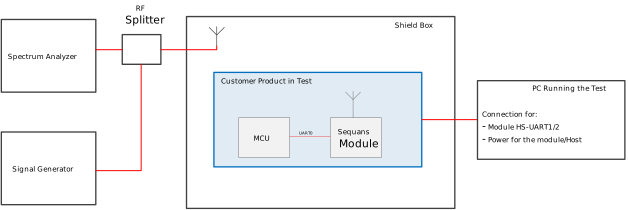
-
Shield Box
It is possible to make measurements without a Shield Box but it does provide isolation from both interfering signals which could compromise the measurement taken & also antenna Field changes because of local environment.
-
Spectrum Analyser
to measure the RF power coming from the GC02S1-WW
-
Signal Generator
to provide the RF signal to catch and measure on the GC02S1-WW
-
PC
Interface to control the GC02S1-WW and execute RF test commands
-
RF splitter
Needed to share the RF path between both equipments.
-
Test fixture
Houses the Test Equipment Antenna & the device under test. Some recommendations:
-
Shield box should be lined with a type of RF absorption material, to reduce internal RF reflections & avoid large variations in measurements
-
RF Attenuation target should be > 50dB for all bands of operation
-
Digital & Analogue signals should pass through decoupled chassis mount interfaces
-
The DUT should sit in some type of bedding. This helps improve the measurement reliability as the DUT location is repeatable
-
-
Antenna
Should be broad band. High Gain (very directive) would be preferable but not compulsory.
-
Interfacing signals
Should be tied/fixed down within the shield box, not left loose. This is to avoid changed in the RF signal field withing the box.
Test Overview
-
All product bands of operation
-
3 Frequencies : low, mid and high
-
One TX power level, 23dBm
-
One RX signal level -45dBm
Calibration of the RF Setup
Over-the-Air (OTA, or radiated) measurements can never be as accurate as those used for conducted measurements, but it is important to ensure that the setup is made as accurate as possible. The following information can help with this.
-
Place a reference “golden” product into the Shield Box. The conducted RF performances, especially TX power measurements at 23dBm, for this reference “golden” product must be known.
-
Record the TX power measurements for each band of operation
-
For each band of operation, compute the difference of the conducted reference power measured vs the radiated power measured. These values are recorded as the Band path losses.
-
Remove the reference “golden” product from the Shield Box
-
Each RF path loss is then used to correct the TX and RX measurements as follows:
-
-
TX: the loss value is added to the Integrated Tx Power Measurement
-
RX: the Signal Generator Signal is increased by the path loss value
-
-
It is recommended to repeat steps 1 to step 4 at least 5 times.
This allows to catch any possible measurement variation due to subtle changes in RF signal propogation within the Shield Box. This variation would also need to be included into Pass/Fail Criteria for the TX and RX measurement limits.
-
Any adjustment to the Shield Box internal arrangement (antenna moved, bedding shape changed or moved, supply and communication cables adjusted) impacts the measurements. In such case, the process shall be repeated.
Testing in Non-Signalling Mode
The procedure to test Rx and Tx performance in CW mode will be detailed in a future release of this document.
Testing in Signalling Mode
Make sure that samples of the product are routinely checked for RF performances in signalling mode. ‘Routinely’ means here to randomly test a sample of a product from manufacture batches.
A specific test equipment, such as CMW500 with signalling software, is required to perform signalling mode test, including connection and RF measurement to emulate a real LTE Category-1 connection.
This CMW500 replaces the Signal Generator and the Spectrum Analyser shown in Figure 33.
Simply power up the module (configured in auto-connect mode) and it should automatically attach to the tester.
Storage and Mounting
Storage Conditions
- The GC02S1-WW module is Moisture Level 3 rated as per JEDEC industrial standard.
- The GC02S1-WW can be reflowed three times at a maximum of 245°C.
- The shelf life of the product in the vacuum-sealed bag is one (1) year from the bag seal date when stored under 40°C/90% RH.
- After the vacuum-sealed bag opening, reflow process must take place within 168 hours provided the factory environment does not exceed 30°C/60% RH.
- Baking is required if either of the two conditions stated above is not met, or if the humidity indicator inside the bag displays 10% RH or more.
- Baking conditions are given in IPC/JEDEC J-STD-033D table 4-1.
| Profile Feature | |
|---|---|
| Solder Paste Alloy | Sn 96.5/Ag 3.0/Cu 0.5 (Lead Free solder paste) |
| Peak Package Body Temperature | 235 °C to 245 °C |
| Fusion Time |
Temp: 217 to 245 °C Duration: 45 to 90 s |
| Pre-heat / Soak |
Temp: 150 to 180 °C Time: 50 to 70 s |
| Ramp-up Rate | Between 0.5 and 4 °C/s |
| Ramp-down Rate | Between -4 and -1 °C/s |
| Air composition | N2, O2 contents less than 1,500 ppm |
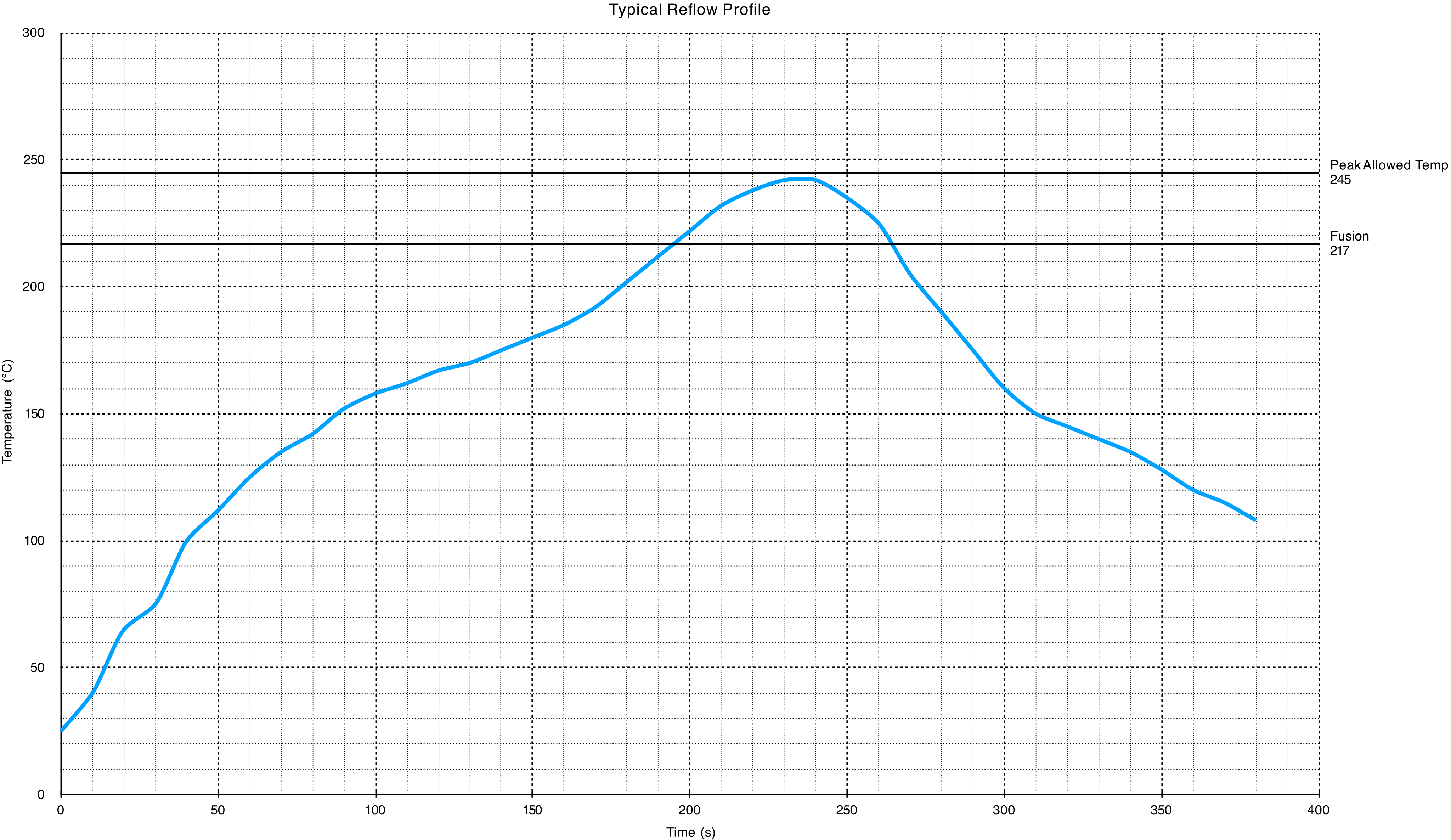
- Use the recommended reflow profile of the solder paste used, ensure that the profile does not exceed the peak allowable temperature of the module as well as the maximum ramp up/down rates.
- Characterize the host PCB and oven temperature using the solder paste reflow profile. Ensure that it will not exceed the peak allowable temperature of the module as well as the maximum ramp up/down rates.
Recommended stencil thickness: 0.08 to 0.13 mm. More detail on the PCB land pattern will be provided in a future edition of the document.
Following reflow soldering, the GC02S1-WW can be washed with deionised RO water to remove any remaining flux. The module then needs a single backing at 125 °C during 16 hours. The module's package may be slightly discoloured during baking.
Reliability Specification
The GC02S1-WW is going through Sequans's industrial reliability specification as described in Table 32, results will be provided in future edition of this document.
| Item | Test conditions | Standard |
|---|---|---|
| Preconditioning |
(a) Bake: 125°C / 24 hours (b) MSL3: 30°C/60% RH, 192 hrs (c) SAT (CSAM & TSCAN)* (d) X-ray (e) Reflow 3 cycles at Tp: 250 ±2°C (f) SAT (CSAM & TSCAN)* Electrical & coplanarity checks |
JESD22-A113 |
| Environmental Testing - A Cold |
Environmental Testing Test A Cold. -45°C |
IEC60068-2-1, JESD22-A119 |
| Environmental Testing - B Dry Heat |
Environmental Testing Test B Dry Heat. +85°C |
IEC60068-2-2, JESD22-A103 |
| HTOL |
High Temperature Operating Test 85°C, Vcc max, Tx: 50% / Rx: 50%. 1000 hours. Read Points at 500 and 1000 hours. |
N/A |
| Temperature cycling | Pre-con:
|
JESD22-A104 |
| THB | Temperature Humidity Bias Test
85 °C, 85% RH, Vcc max, 1000 hours. Read points at 500 and 1000 hours. |
JESD22-A101 |
| Human Body Model ESD | 25°C, HBM Start: ±1000 V, Stop: ± 1500 V | JS-001, JESD22-A114 |
| Charged Model ESD | 25 °C, CDM Start: ±250 V, Stop: ±500 V | JS-002, STM5.3.1 |
| Shock |
Mechanical Shock (MS) (Half Sine, 500 g, 1.0 ms, 1 shock for each ±axis) Half Sine, 500 m•s⁻², 11 ms, 6 shocks (1 shock for each ±axis) |
DIN IEC 68-2-27 |
| Vibration |
Vibration Test (Vib) Sweep-Sine Vibration. Sinusoidal, 10 ~ 500 Hz, 1 octave/min, 10 sweep cycles for two hours on each axis. |
DIN IEC 68-2-6 EIA, TIA 571 §4.1.1.2 |
| Drop |
Drop Test 1. Height: 80 cm 2. Concrete or steel 3. All surfaces and edges |
DIN IEC 68-2-31, ETS 300019-2-7 |
| TCT |
Temperature Change Test 10 cycles; 1 cycle has the following steps (roughly 7+ hrs):
Electrical test performed after ten cycles. |
IEC60068-2-14 |
| Dimensions | Package Physical Dimension (Warpage included) | N/A |
| Drop (Transportation) | Free Fall. 1 corner, 3 edges and 6 faces at a height of 76 cm. | ASTM D5276 |
Mechanical Characteristics
Package Description
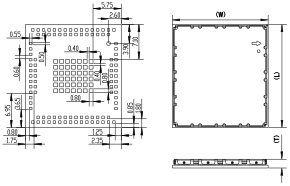
The package size with tolerance is (19.5 ± 0.10) mm × (21.0 ± 0.10) mm × (1.9 max) mm. Maximum ‘warpage’ is 0.13 mm (as per JEITA ED7306).
The GC02S1-WW weighs 1.73 g.
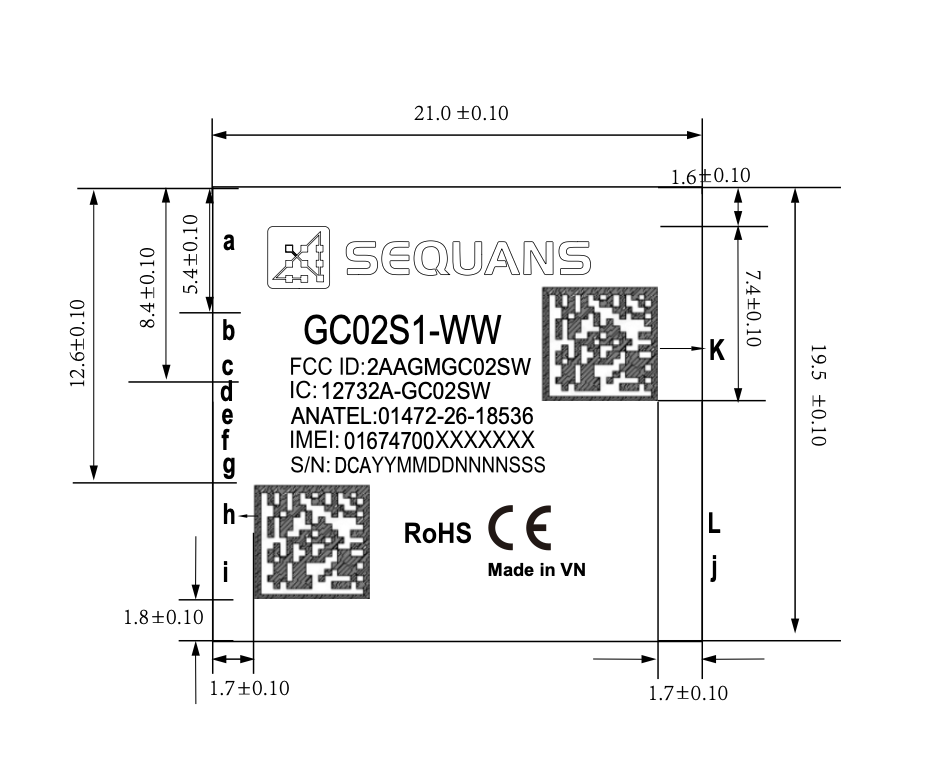
- SEQUANS
- Model Name
- FCC ID: 2AAGMGC02SW
- IC: 12732A-GC02SW
- ANATEL: 01472-26-18536
- IMEI:01674700XXXXXXX
- S/N:AJAYYMMDDNNNNSSS (16 digits)
- AJA: reserved, value subject to change at Sequans’s discretion (3 digits).
- YYMMDD: Manufacturing Date (YY:Year;MM:Month,DD:Day).
- NNNN: Panel counter (from 0001~9999).
- SSS: Piece location on panel (from 001~036).
- 2D marked "g" refer to S/N Barcode
- ROHS
- Made in VN
- 2D marked "K" refer to IMEI Barcode
- CE
Environmental Conditions
Packing
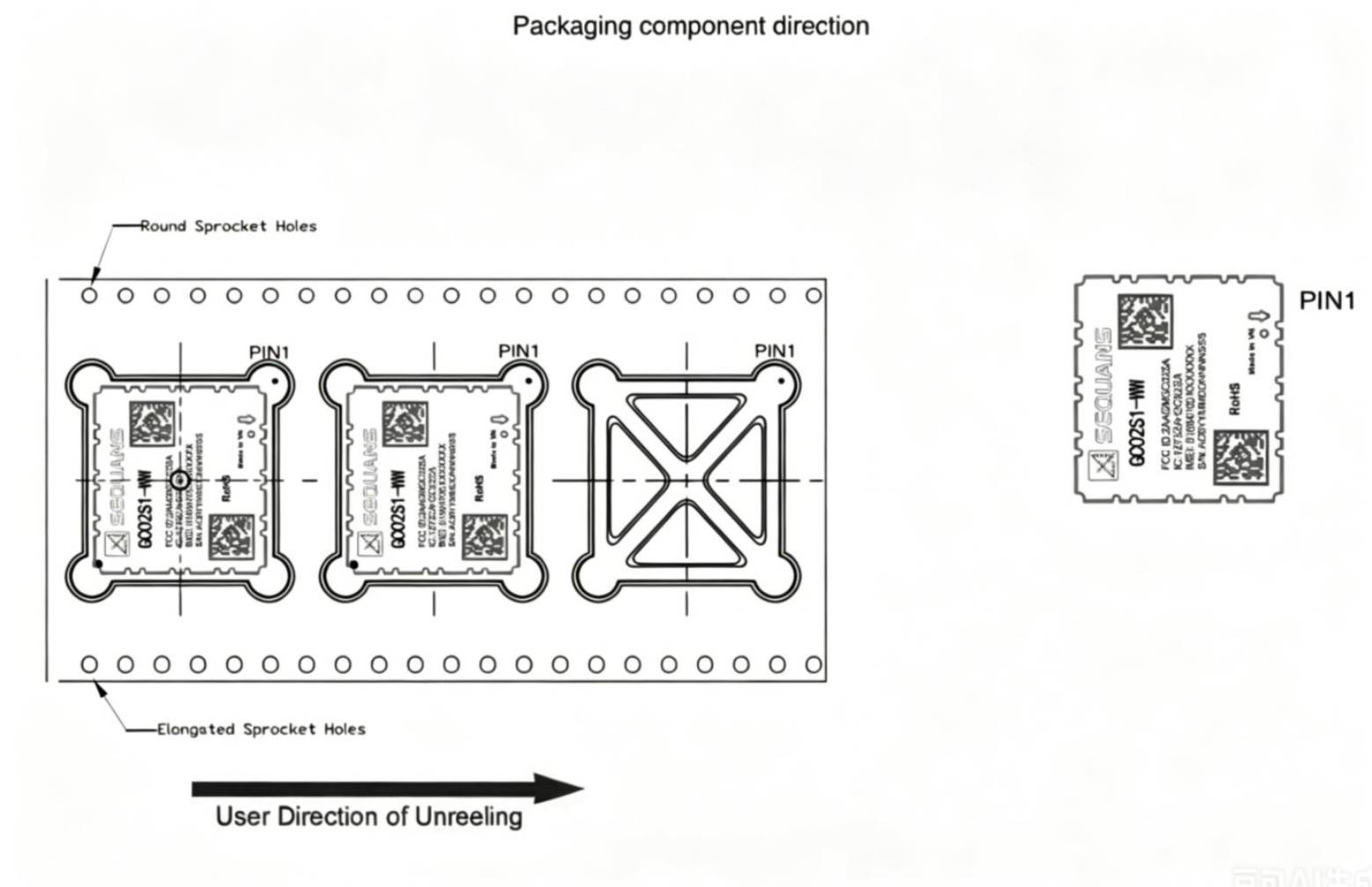
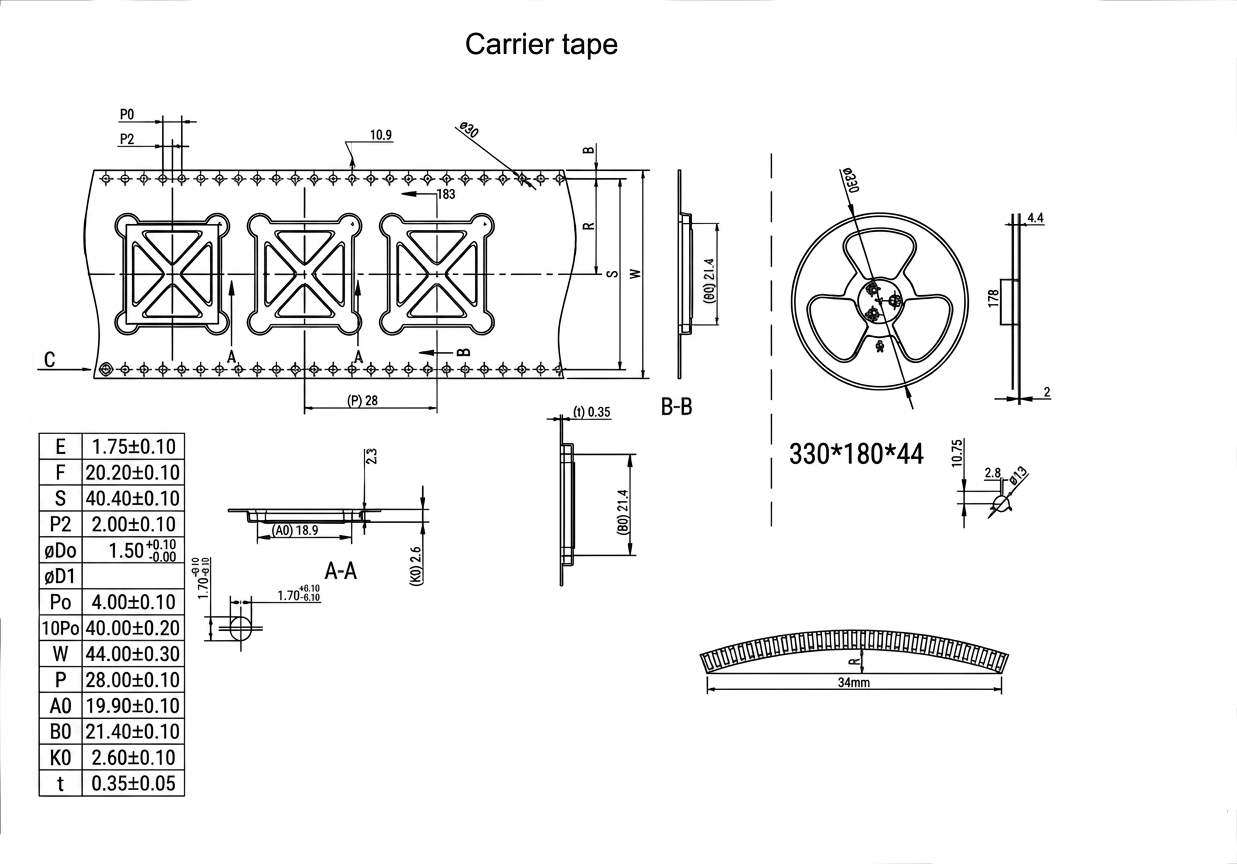
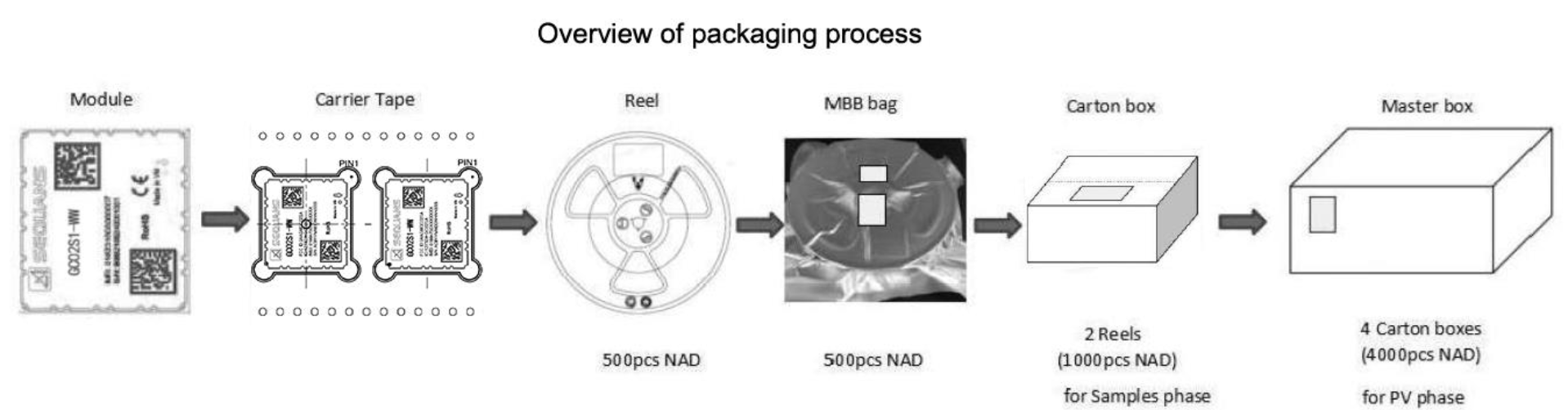
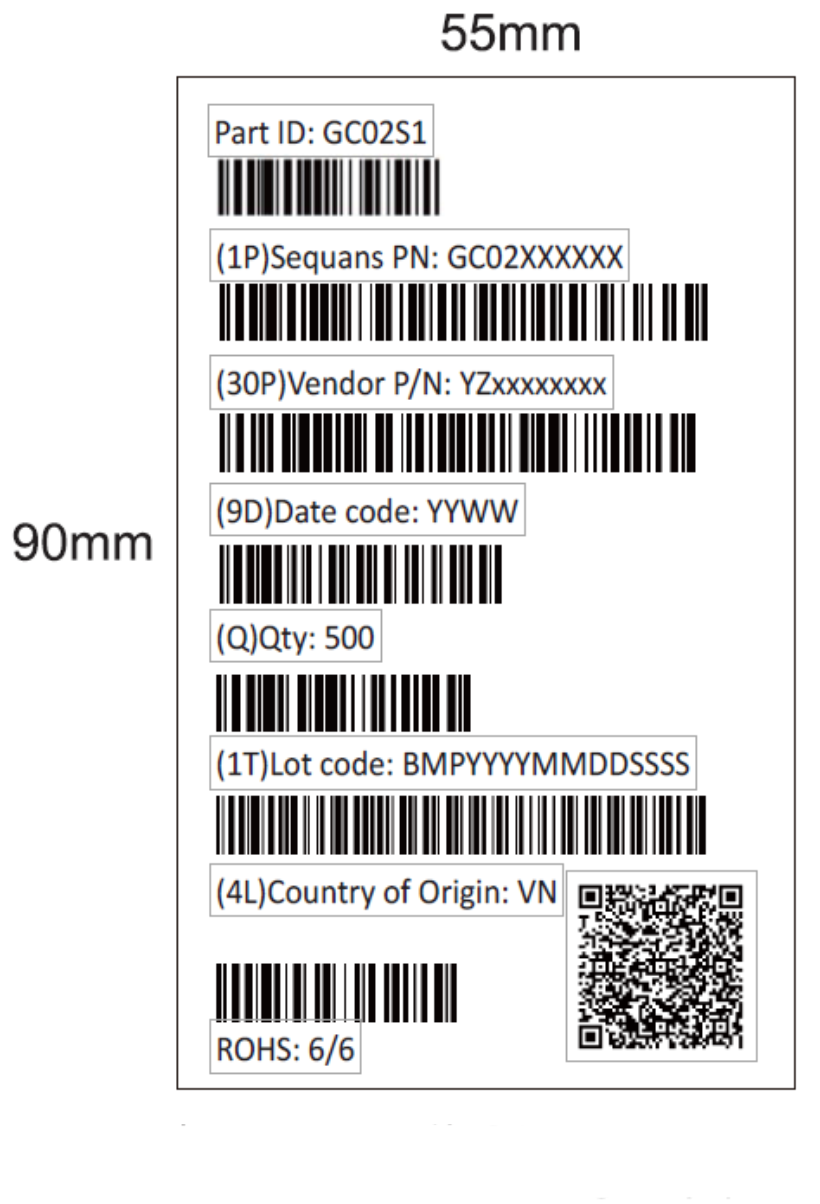
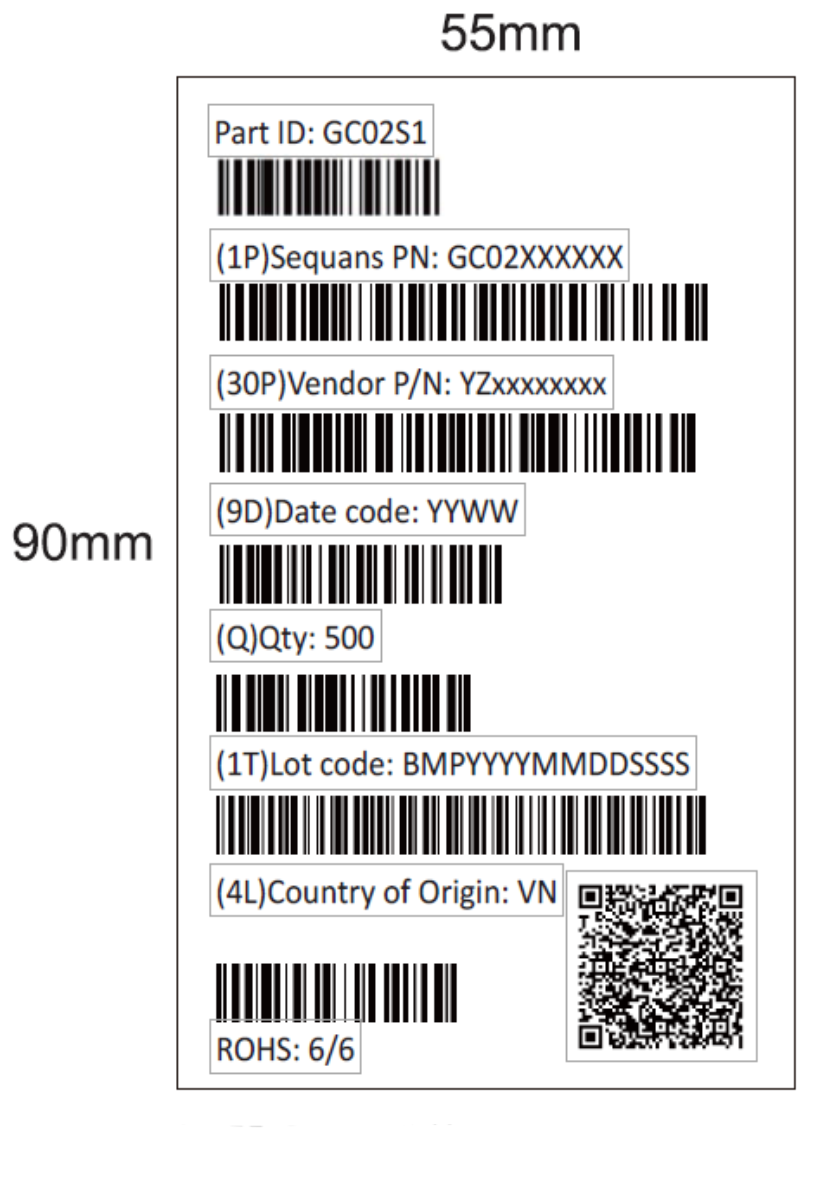
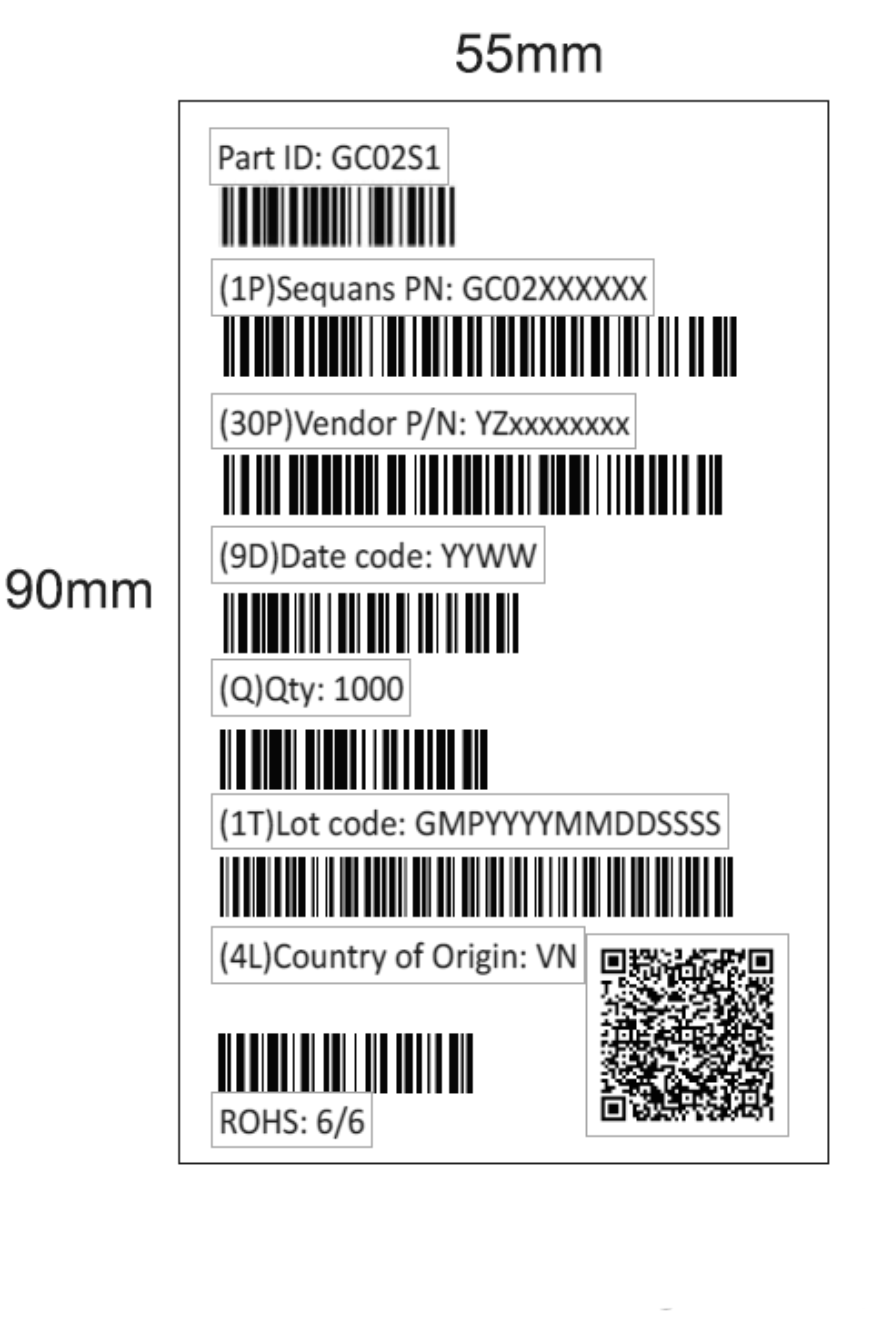
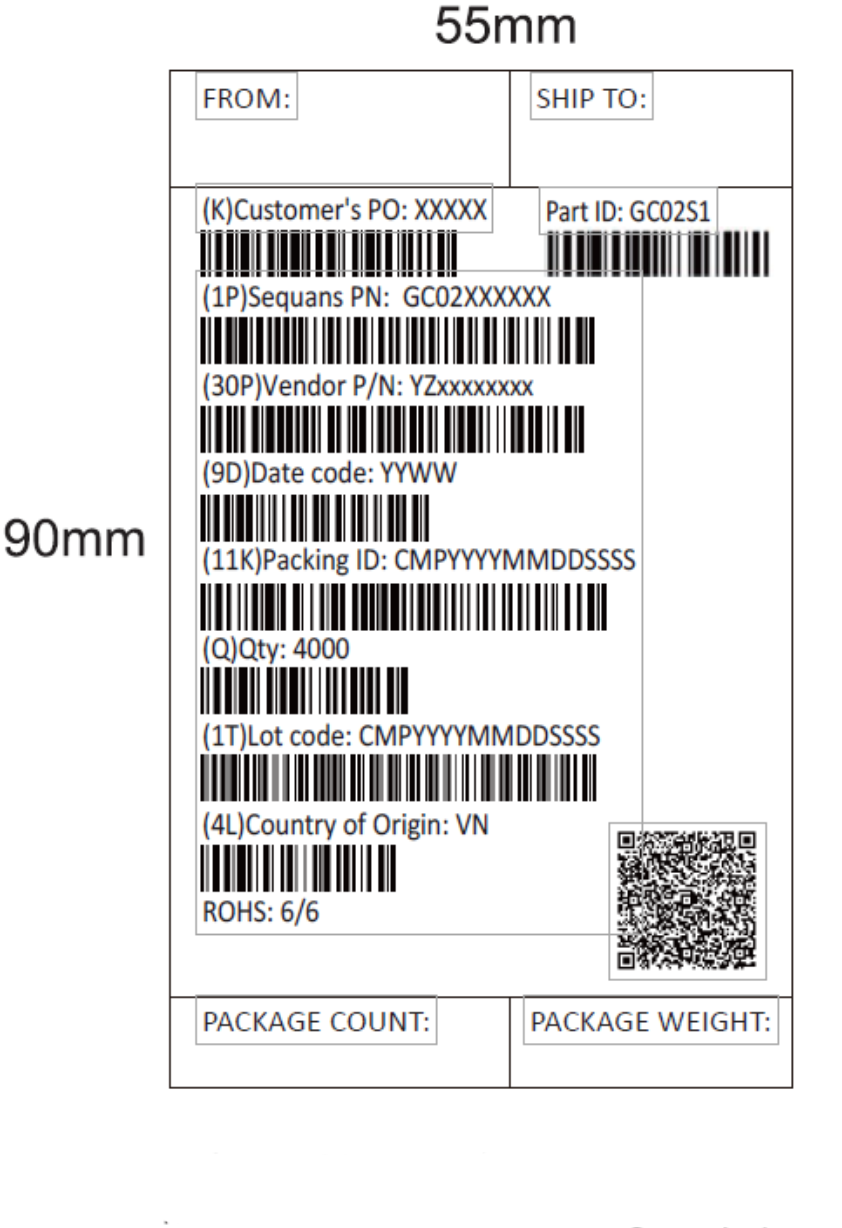
The label attached to reels is shown in Figure 40. The label attached to the moisture barrier bags (MBB) is shown in Figure 41. The label attached to the cardboard box (which contains 2 MBB boxes) is shown in Figure 42. The label attached to the master box, which contains 4 cardboard boxes, is shown in Figure 43.
Weight: 2 reels: 4.5 ± 0.5 kg. 1 master box: 21 kg ± 0.5 kg.
Regulatory Approval
The GC02S1-WW has FCC (ISED), PTCRB, GCF, ACMA, AT&T, Anatel and RED certifications.
The corresponding certificates are available on Sequans’s cloud platform.
FCC Regulatory Approval
FCC-ID: 2AAGMGC02SW (single modular approval)
This above identified LTE radio module is not intended to be provided to end-users but is for installation by OEM integrators only.
Installation/Integration
- TRIO mXTEND™ (NN03-310): peak gain 2.4 dBi
OEM integrators must follow Sequans’ installation instructions to provide for and benefit from FCC compliant module integrations and must abide especially by the following provisions:
- LTE band 2 (1900 PCS): 9 dBi
- LTE band 4 (AWS-1): 6 dBi
- LTE band 5 (850): 10.41 dBi
- LTE band 12 (700a): 9.7 dBi
- LTE band 13 (700c): 10.16 dBi
- LTE band 17 (700b): 9.73 dBi
- LTE band 25 (1900+): 8.8 dBi
- LTE band 26 (Extended Cellular): 10.36 dBi
- LTE band 66 (AWS-3): 5.5 dBi
Sequans's module integration guidelines must be closely followed.
Compliance of host integrations of the module is limited to hosts adaptation designs which are identical to Sequans' reference design.
Host integrations with adaption designs deviating from Sequans' reference design require either class 2 permissive change to this modular approval or a separate host approval with different FCC-ID;
Host integrations with co-located (simultaneously operating) radio transmitters must be evaluated in accordance with FCC multi-transmitter rules and may require either class 2 permissive change to this modular approval or a separate host approval with different FCC-ID, dependent on the result of the evaluation; Inquiry at FCC or a TCB is urgently recommended.
Integrations of the module into host products which are intended for portable use, i.e. less than 20cm distance between its radiating structures (antenna) and the body of nearby persons, or which otherwise put additional technical requirements like Hearing Aid compatibility require either class 2 permissive change to this modular approval or a separate host approval with different FCC-ID;
Compliance with Unwanted Emission Limits for Digital Device
If the OEM host integration fully complies with the above described reference design and can completely inherit and rest on compliance of the existing modular approval the OEM remains still responsible to show compliance of the overall end-product with the FCC limits for unwanted conducted and radiated emissions from the digital device (unintentional radio) portion of such end-product (commonly addressed as part 15B compliance or similar).
End-product Labelling
- The module's FCC-ID must either be visible from the exterior of the host product (e.g. per window) or per electronic display, or shall be displayed on an additional exterior label per the following or similar string: contains FCC-ID: 2AAGMGC02SW
- Digital Device - Unwanted Emissions Notice: If the end-product falls under part 15 of the FCC
rules (it shall display the following user notice on its exterior acc. to part 15.19 (the notice
may be printed in the manual in case the host is too small):
This device complies with Part 15 of the FCC Rules. Operation is subject to the following two conditions: (1) This device may not cause harmful interference, and (2) This device must accept any interference received, including interference that may cause undesired operation.
- Further Labelling Requirements may apply dependent on the FCC rule parts relevant to the host product.
- End-product User Instructions / Notices in the Manual: At a minimum, end-product users must be
provided with the following notices at a prominent location of the product literature furnished
with the product:
- Product Modifications: Modifications not expressly approved by the party responsible for compliance could void the user’s authority to operate this equipment.
- RF Exposure Compliance: This equipment complies with FCC radio frequency radiation exposure rules and limits set forth for an uncontrolled environment, when installed and operated with minimum distance of 20 cm between its radiating structures (antenna) and the body of nearby persons and when not operated simultaneously with other nearby radio-transmitters.
- Maximum Antenna Gain: The user instructions of end-products equipped with standard external antenna connectors for the modular radio transmitter providing the option to connect other antennae than those which may or may not be bundled with the end-product must list the maximum allowed antenna gain values as derived from those given above, accounting for the cable attenuations of the actual installation.
- Digital Device - Unwanted Emissions Notice: If the end-product is or contains a digital
device (unintentional radio portions) and is not exempted by its use case (like
vehicular use) the following part 15.105 (b) user notice shall be provided at prominent
location of the product literature:
This equipment has been tested and found to comply with the limits for a Class B digital device, pursuant to part 15 of the FCC rules. These limits are designed to provide reasonable protection against harmful interference in a residential installation. This equipment generates, uses and can radiate radio frequency energy and, if not installed and used in accordance with the instructions, may cause harmful interference to radio communications. However, there is no guarantee that interference will not occur in a particular installation. If this equipment does cause harmful interference to radio or television reception, which can be determined by turning the equipment off and on, the user is encouraged to try to correct the interference by one or more of the following measures:
- Reorient or relocate the receiving antenna;
- Increase the separation between the equipment and receiver;
- Connect the equipment into an outlet on a circuit different from that to which the receiver is connected;
- Consult the dealer or an experienced radio/TV technician for help
- Further User Notices: May be required dependent on the FCC rule parts relevant to the host product.
- Non-allowed User Instructions: The end-product user guidance may NOT include instructions about how to install or de-install the module.
ISED Regulatory Approval
ISED ID: 12732A-GC02SW
This device complies with ISED’s licence exempt RSSs. Operation is subject to the following two conditions: (1) This device may not cause harmful interference, and (2) this device must accept any interference received, including interference that may cause undesired operation.
Le présent appareil est conforme aux CNR de l’ISED applicables aux appareils radio exempts de licence. L’exploitation est autorisée aux deux conditions suivantes : (1) le dispositif ne doit pas produire de brouillage préjudiciable, et (2) ce dispositif doit supporter tout brouillage reçu, y compris un brouillage susceptible de provoquer un fonctionnement indésirable.
This radio module was tested and found in compliance with ISED rules using the following antenna:
- TRIO mXTEND™ (NN03-310): peak gain 2.4 dBi
This device is intended only for OEM integrators under the following conditions: (For module device use)
- The antenna must be installed such that 20 cm is maintained between the antenna and users, and
- The transmitter module may not be co located with any other transmitter or antenna.
- L'antenne doit être installée de telle sorte qu'une distance de 20 cm est respectée entre l'antenne et les utilisateurs, et
- Le module émetteur peut ne pas être co implanté avec un autre émetteur ou antenne.
- LTE band 2 (1900 PCS): 9 dBi
- LTE band 4 (AWS-1): 6 dBi
- LTE band 5 (850): 10.41 dBi
- LTE band 12 (700a): 9.7 dBi
- LTE band 13 (700c): 10.16 dBi
- LTE band 17 (700b): 9.73 dBi
- LTE band 25 (1900+): 8.8 dBi
- LTE band 26 (Extended Cellular): 10.36 dBi
- LTE band 66 (AWS-3): 5.5 dBi
IMPORTANT NOTE:
In the event that these conditions can not be met (for example certain laptop configurations or colocation with another transmitter), then the Canada authorisation is no longer considered valid and the IC ID can not be used on the final product. In these circumstances, the OEM integrator will be responsible for re-evaluating the end product (including the transmitter) and obtaining a separate Canada authorisation.
NOTE IMPORTANTE:
Dans le cas où ces conditions ne peuvent être satisfaites (par exemple pour certaines configurations d'ordinateur portable ou de certaines co-localisation avec un autre émetteur), l'autorisation du Canada n'est plus considéré comme valide et l'ID IC ne peut pas être utilisé sur le produit final. Dans ces circonstances, l'intégrateur OEM sera chargé de réévaluer le produit final (y compris l'émetteur) et l'obtention d'une autorisation distincte au Canada.
End Product Labelling
This transmitter module is authorised only for use in device where the antenna may be installed such that 20 cm may be maintained between the antenna and users. The final end product must be labeled in a visible area with the following: “Contains IC:12732A-GC02SW”.
Plaque signalétique du produit final
Ce module émetteur est autorisé uniquement pour une utilisation dans un dispositif où l'antenne peut être installée de telle sorte qu'une distance de 20 cm peut être maintenue entre l'antenne et les utilisateurs. Le produit final doit être étiqueté dans un endroit visible avec l'inscription suivante: “Contient des IC: 12732A-GC02SW”.
Manual Information To the End User
The OEM integrator has to be aware not to provide information to the end user regarding how to install or remove this RF module in the user's manual of the end product which integrates this module.
The end user manual shall include all required regulatory information/warning as show in this manual.
Manuel d'information à l'utilisateur final
L'intégrateur OEM doit être conscient de ne pas fournir des informations à l'utilisateur final quant à la façon d'installer ou de supprimer ce module RF dans le manuel de l'utilisateur du produit final qui intègre ce module.
Le manuel de l'utilisateur final doit inclure toutes les informations réglementaires requises et avertissements comme indiqué dans ce manuel.
ANATEL Regulatory Approval
- ANATEL Number: 01472-26-18536
- “Este equipamento não tem direito à proteção contra interferência prejudicial e não pode causar interferência em sistemas devidamente autorizados – Para maiores informações, consulte o site da Anatel.”
Troubleshooting
JTAG interface is required to access the processor if the board does not boot properly and provides no console output.
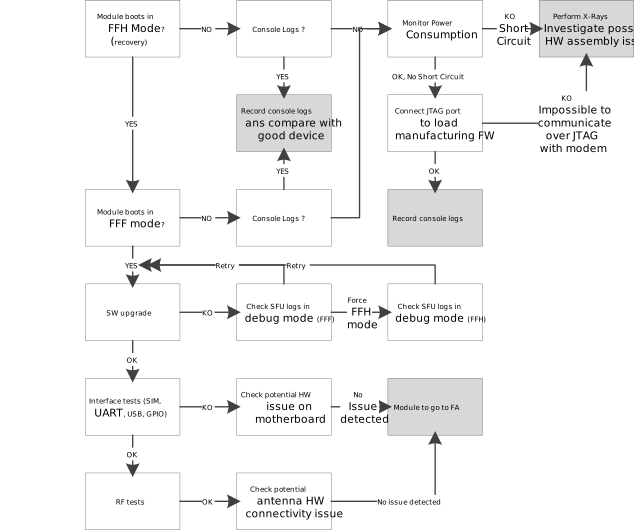
JTAG Investigations
This annexe provides details on the hardware and software requirements to operate JTAG on the GC02S1-WW module.
Hardware Setup
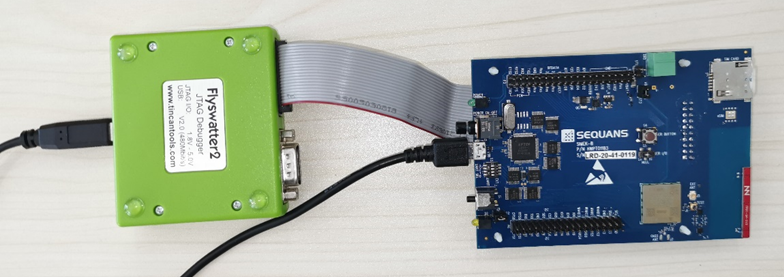
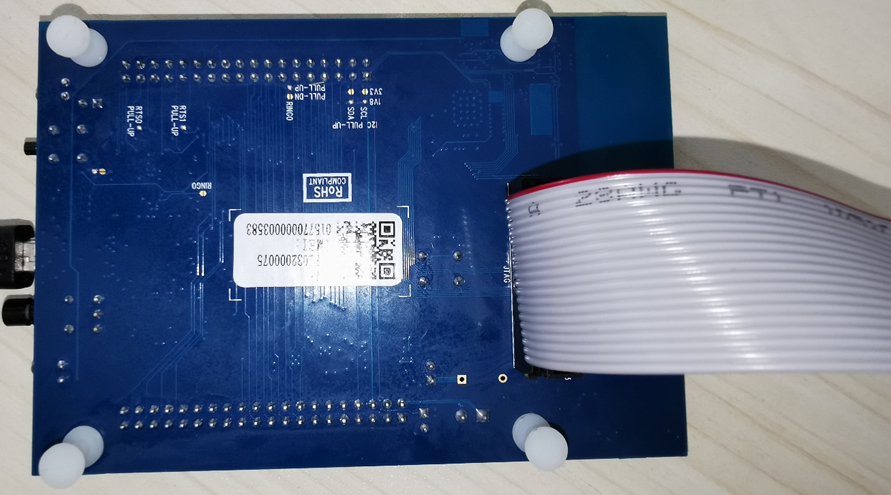
Software Setup
The Flyswatter box is used as JTAG probe with Calliope 2 chipsets.
-
Enable Linux for using JTAG without root access
-
Customize the ANDES AICE-MCU box’s firmware.
-
Edit JTAG configuration file
-
Patch OpenOCD
-
- The following procedure needs to be done only once on
your Linux, to be able to use the JTAG without root
access:
- Create a file
/etc/udev/rules.d/99-andes.rulesin which you put the following line:SUBSYSTEMS=="usb", ACTION=="add", ATTRS{idVendor}=="1cfc", GROUP="plugdev", MODE="0664" - Then reload your
udevrules:sudo udevadm control --reload-rules - Then add yourself into the
plugdevgroup if you are not already:sudo usermod -a -G plugdev $USER
- Create a file
- Confirm that the AICE box is recognized by your PC:
If you have followed the PC configuration section above, you should have read/write access to the USB device. This is confirmed by the first line of the output listed above.$> dmesg | tail [ 537.324026] usb 3-1.3.3: new high-speed USB device number 6 using ehci_hcd [ 544.956983] usb 3-1.3.3: New USB device found, idVendor=1cfc, idProduct=0000 [ 544.956989] usb 3-1.3.3: New USB device strings: Mfr=1, Product=2, SerialNumber=0 [ 544.956993] usb 3-1.3.3: Product: AndeShape AICE [ 544.956995] usb 3-1.3.3: Manufacturer: Andes Technology Corp.
The first digit of the[ 537.324026] usb 3-1.3.3: new high-speed USB device number 6 using ehci_hcdusb 3-1.3.3part is the USB bus number, 3 in this case. The device number is 6.This means that your USB device file is located at
/dev/bus/003/006:
The file is owned by the$> ls -l /dev/bus/usb/003/006 crw-rw-r-T 1 root plugdev 189, 261 Apr 5 16:07 /dev/bus/usb/003/006plugdevgroup and that the group have the read and write permissions on it, all is fine.However, if the file is owned only by
root, then type the following command to change the owning group toplugdev:$> sudo chgrp plugdev /dev/bus/usb/003/006 - Download and update the JTAG repository:
We will refer to this repository asgit clone ssh://$USER@git-share.sequans.com:29418/4G/platform/jtagJTAG/.Edit the file
JTAG/amontec/helpers/generic.cfgand uncomment the following line:source [file join [file dirname [info script]] ".." "gerbil" "Andeshape_AICE.cfg"] - Rebuild OpenOCD
Download the OpenOCD repository:
git clone ssh://$USER@git-share.sequans.com:29418/4G/platform/openocdTo build OpenOCD, go into the source directory and execute:
./bootstrap ./configure MAKEINFO=true --enable-aice --disable-werror make make installNote:- You may need to run
sudo make install - If you use recent system
(
aclocal> 1.11), you should revert to4f1c4f3e48cf2a2a4c9bf1e8a7ca83c23ff78535before doing this procedure.
- You may need to run
Run OpenOCD
$> openocd -f ../gerbil/gerbil-rst.cfg
Open On-Chip Debugger 0.9.0 (2017-03-01-16:46)
Licensed under GNU GPL v2
For bug reports, read http://openocd.org/doc/doxygen/bugs.html
script ../gerbil/gerbil.cfg
Info : only one transport option; autoselect 'aice_jtag'
trst_and_srst separate srst_gates_jtag trst_push_pull srst_open_drain
    connect_deassert_srst
adapter speed: 24000 kHz
adapter speed: 100 kHz
trst_only separate trst_push_pull
adapter speed: 24000 kHz
Info : AICE version: hw_ver = 0x10001, fw_ver = 0xa, fpga_ver = 0xc
Info : AICE hardware features: 0xc0000004
Info : AICE batch data buffer size: 512 words
Andes AICE-MCU v1.10.12
Info : AICE initialization started
There is 1 core in target
Core #0: EDM version 0x0
Info : AICE JTAG Interface ready
JTAG frequency 24 MHz
Info : clock speed 24000 kHz
Info : bb: soft-reset-halt: off
Info : bb: global stop: off
 ----------------------------------
| Board ready for JTAG debugging.  |
 ----------------------------------

Telenet to localhost, port 4444 (shell command : telnet localhost 4444),
or connect to remote target via GDB, port 3333 (command inside GDB : target
remote localhost:3333).- GDB
The preferred way to debug with JTAG is by using GDB.
GDB is provided by the Andes toolchain, the binary name is
nds32be-elf-gdb. - Telnet
You can use telnet to communicate with openocd:
You can type '$> telnet localhost 4444 Trying ::1... Trying 127.0.0.1... Connected to localhost. Escape character is '^]'. Open On-Chip Debugger >help' to get all supported commands.You can erase parts of the flash by using the command
erase <offset> <size>:erase 0x20000 1024You can burn a raw file into the flash by using the command
flash_file <file> <offset>:flash_file /tmp/bootrom.rast 0Note:To boot mTools, use following command:If the flash was already written before, it is necessary to useerasecommand to clear the flash before usingflash_filecommand, otherwise you will hit readback errors.load_image mtools.elf resume 0x1000load_imagecommand takes around 10 minutes to finish.
Acronyms
| Acronym | Definition |
|---|---|
| ADC | Analogue to Digital Converter |
| CPU | Central Processing Unit |
| DL | Downlink |
| ESD | Electro-static discharge |
| ETSI | European Telecommunications Standard Institute |
| GND | Ground |
| GPIO | General Purpose Input Output |
| I/O | Input/Output |
| I²C | Inter-Integrated Circuit interface |
| IMEI | International Mobile Equipment Identity |
| IP | Internet Protocol |
| JTAG | Joint Test Action Group |
| LGA | Land Grid Array |
| LNA | Low-Noise Amplifier |
| LTE | Long Term Evolution, or 4G. Standard is developed by the 3GPP. |
| MIMO | Multiple In Multiple Out |
| NAS | Network Access Server |
| PCM | Pulse-Code Modulation |
| PHY | Physical Layer |
| RED | European Radio Equipment Directive |
| RF | Radio Frequency |
| RoHS | Restriction of Hazardous Substances |
| Rx | Reception |
| SAW | Surface Acoustic Wave (filter) |
| S/N | or SN: Serial Number |
| SIM | Subscriber Identification Module |
| SMS | Short Message Service |
| SPI | Serial Peripheral Interface |
| Tx | Transmission |
| UART | Universal Asynchronous Receiver Transmitter |
| UE | User Equipment |
| UL | Uplink |
| USB | Universal Serial Bus |
software upgrade.
software upgrade.
upgrade.